Jackery vs Bluetti: Which Power Station Is Better? (October 2026)
Choose the Jackery Explorer 1000 v2 for a lighter carry, the Bluetti Elite 100 V2 for higher output and UPS backup, or the AC180 for more capacity. Your appliances and how you plan to move or recharge the station should settle the choice.
On this page (11 sections)
- Jackery vs Bluetti: which should you choose?
- What should you check before buying?
- How do output and capacity affect your choice?
- Which Jackery or Bluetti is better for outage backup?
- Which model is easier to carry?
- Which charges faster, and what should you know about solar?
- Which ports and controls are useful for your gear?
- Who should skip each option?
- How should you set up and care for a power station?
- Which Jackery vs Bluetti model is the right decision?
- Related guides
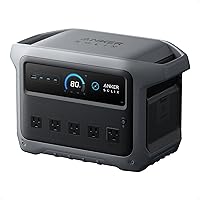
For a lighter carry, choose the Jackery Explorer 1000 v2; for higher rated AC output and UPS backup, choose the Bluetti Elite 100 V2. The Bluetti AC180 suits buyers who want more capacity and expect to keep the station in one place.
This Jackery vs Bluetti comparison covers three stations near the 1 kWh class. Their output, backup features, charging options and weight affect the buying decision more than the modest capacity difference between the two smaller models.

Jackery vs Bluetti: which should you choose?
Choose the Jackery for easier carrying, the Elite for UPS backup and higher rated output, or the AC180 for more capacity. First list the devices you need to run, then compare their power draw and how long you need them to stay on.
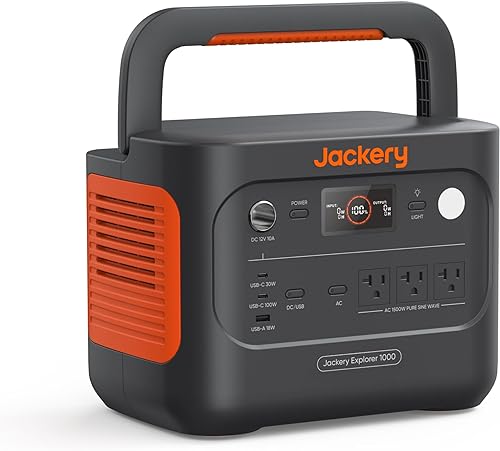
The Explorer 1000 v2 is the lightest option here at 23.8 lb. Its 1,070Wh battery and 1,500W AC rating suit buyers with moderate loads who may move the station between a car, campsite and home.
The Elite 100 V2 weighs 25 lb and provides 1,800W rated AC output. Its 10ms UPS feature gives it a clear role for compatible devices that need automatic backup when household power drops.
The AC180 raises capacity to 1,152Wh and has 1,800W output. At 37.4 lb, it makes more sense for a set location or occasional repositioning than for frequent carrying.
All three use LFP batteries. The size of the battery alone does not tell you whether a station will meet your needs: output limits, appliance startup draw, recharge access and total runtime matter too.
What should you check before buying?
Check appliance demand, required runtime, recharge access and carrying needs before choosing a model. These four questions catch most mismatches between a power station and the job you expect it to do.
Start with your essential devices, such as a router, phone, lights, refrigerator or medical equipment. Record each device's running wattage and, for appliances with motors, its startup demand; use the appliance label or manual rather than guessing.
Next, decide how long you need those devices to run. A station can handle a device's watt draw but still run short of energy before the outage ends, especially if several devices draw power at once.
Then consider where you'll recharge. The Jackery's solar charging is limited to Jackery panels, while the Elite accepts compatible third-party solar panels within its stated input limits.
If you plan to use solar, check panel voltage, total input and connector compatibility before buying either a station or a panel.
Finally, picture the route from storage to use. A station that stays beside a desk can be heavier than one you'll lift into a car or carry across a campsite.
Our portable power station buying checklist lays out the same planning steps in more detail.
How do output and capacity affect your choice?
Output limits the load a station can run at one time; capacity helps estimate how long it can run that load. Compare both with your devices before settling on a model.
The Jackery is rated for 1,500W AC, while the Elite and AC180 are each rated for 1,800W. If an appliance's normal draw is above the Jackery's rating, that points toward one of the Bluetti options, provided its own limits and the appliance's startup draw also fit.
Startup draw can rise briefly when a refrigerator or other motor starts. The Jackery lists a 3,000W surge peak, and the Elite lists 3,600W surge power.
A surge figure is not the same as continuous output, so check both the appliance's startup needs and the station's rated output.
Capacity is measured in watt-hours. Here, the AC180 has the largest battery at 1,152Wh, followed by the Jackery at 1,070Wh and the Elite at 1,024Wh.
That small gap between the two lighter models is unlikely to settle a decision if one offers the output or backup feature you need.
A rough runtime estimate divides capacity by average device wattage, but conversion losses and changing power use shorten the real result. Use a conservative estimate and plan for the refrigerator or other cycling appliance to draw power intermittently.
Our plain guide to watts and watt-hours explains how to work with both figures.
Which Jackery or Bluetti is better for outage backup?
The Elite 100 V2 is the clearest pick for devices that need UPS switchover, with a stated 10ms transition. The AC180 also has UPS capability, with a stated 20ms switchover.
A UPS feature can help keep select devices supplied during a power interruption, but it does not provide whole-home backup. Check the device's compatibility, its power draw and the station's instructions, then decide whether battery runtime is enough for the outage you may face.
The Jackery's listed features do not specify UPS switchover. If you need a station to take over automatically for a router or computer, the Elite's specified 10ms transition makes it the more direct fit among these three.
If automatic transfer is not essential, you can also plug devices in after an outage starts. In that case, focus on output, capacity and the number and types of ports you need.
Before an outage, make a short load plan. Decide which devices get power first, which can wait and which should stay off if the battery runs low.
Our storm outage power station guide can help you prioritize household essentials.
Is Jackery vs Bluetti better for a refrigerator or small appliance?
The Elite and AC180 have higher rated output than the Jackery, but any station must still handle the appliance's startup demand. Look at both running and starting wattage before connecting a refrigerator or other motor-driven device.
A refrigerator's compressor cycles, so its average draw can differ from its draw while running. Leave headroom for startup and other devices rather than planning to use the station at its limit.
The same check applies to electric pots, kettles and other high-draw appliances. Add up the devices you want to use at once, and keep their combined draw below the station's rated AC output.
Does Jackery vs Bluetti matter for keeping Wi-Fi on?
The Elite 100 V2 is the clearest match if you want stated UPS switchover for a router. Runtime still depends on the router's draw and any other loads connected to the station.
If you're comfortable plugging in the router after the outage begins, all three models may suit the job if their output and available energy meet your needs. Automatic switchover is a separate feature from simply having a battery ready to use.
Which model is easier to carry?
The Jackery is the lightest choice, while the Elite is only 1.2 lb heavier and the AC180 weighs 37.4 lb. Think about the whole lift and route, not only the number on the scale.
The Explorer 1000 v2 has a foldable handle. The Elite has a hidden handle, and both are in the roughly 1 kWh class.
If you're moving a station from a car to a nearby campsite, either smaller option may be easier to manage than the AC180.
The AC180 trades portability for greater stated capacity. It can be a sensible choice for a home backup location where you can leave it ready, but its weight is a poor fit if you plan to move it often or carry it far.
Measure the storage space and consider stairs, doorways and vehicle loading before you buy. A compact cabinet still needs a safe, accessible place where you can reach its outlets and charging connections.
Which charges faster, and what should you know about solar?
The Jackery's one-hour figure is for a full charge with emergency charging enabled; the Elite's 45-minute figure is for 80%. Compare the same charge endpoint when deciding which recharge time matters to you.
The Jackery defaults to a 1.7-hour full charge and uses its app to enable one-hour emergency charging before each charge. That faster setting can help when time is short, while the normal mode is the default for battery health.
The Elite reaches 80% in about 45 minutes using 1,200W AC fast charging, and its full charge takes about 70 minutes. The AC180's stated full AC charge time is one hour at 1,440W input.
Solar can help when wall power is unavailable, but it depends on sunlight, panel placement and the station's input limits. The Jackery only works with Jackery solar panels for solar charging.
The Elite supports third-party panels that meet its voltage, wattage and connector conditions, while the AC180 accepts up to 500W solar input.
Don't buy panels based on wattage alone. Confirm that their voltage and connectors match the station, and remember that shade, clouds and the angle of the panels can reduce charging.
Our guide to portable power station charging time covers the factors that affect a recharge.
Which ports and controls are useful for your gear?
The Jackery has three AC ports, the Elite has 11 total ports, and the AC180 has 8 outlets. Choose by matching the ports to your devices and cables, then check the combined load.
The Jackery includes three pure sine wave AC ports, two USB-C ports, one USB-A port and a DC car port. Its USB-C ports support up to 100W charging, which can suit compatible devices that charge over USB-C without a separate power adapter.
The Elite has 11 ports for charging several devices at once. Check the actual port types and your devices' input needs before relying on that total.
The AC180 includes AC, car and solar charging cables, and its eight outlets offer several connection points. Outlet count does not raise the station's output limit: appliances plugged in at the same time still share the available power.
For first use, charge the station using the method you plan to rely on, learn which ports supply AC and DC power, and try your essential devices while power is available. Keep the manual nearby so you can check operating limits and the correct charging procedure.
Who should skip each option?
Skip the Jackery if your appliance needs more than its 1,500W rated output or you need solar panels from another brand. Its lower weight will not make up for a mismatch with your equipment or recharge plan.
Skip the Elite if a 1.2 lb lighter carry matters more than its higher output and UPS feature, or if your solar panels fall outside its input requirements. Its 1,024Wh capacity is also the lowest of these three, though the difference from the Jackery is small.
Skip the AC180 if frequent carrying is part of the plan. Its extra capacity may be useful at a fixed backup point, but you may prefer a lighter station if it needs to move between rooms, vehicles or campsites.
Skip all three if your essential appliances exceed their output limits or you need longer runtime than a roughly 1 kWh station can provide. Consider a larger backup system, reduce the number of devices you plan to run, or find another power source for high-demand equipment.
How should you set up and care for a power station?
Read the manual, test your intended setup while power is available and keep the station upright, dry and uncovered. Simple preparation makes it easier to connect the right devices when you need backup.
Choose a stable spot with room around the unit and access to its ports. Keep cords tidy, avoid blocking vents and follow the manual's guidance about operating conditions and storage.
For the Elite, keep the unit upright during transport and storage; Bluetti cautions against laying it on its side. With every model, secure the station in a vehicle so it cannot shift, and avoid carrying it by cables or attached accessories.
Charge the station before a trip or forecast outage, and check its battery level periodically if it is stored for emergencies. Follow the manufacturer's storage and recharge instructions rather than leaving a battery unused for long periods without checking it.
Common mistakes include overlooking startup draw, connecting too many devices at once, confusing surge power with continuous output and buying incompatible solar panels. Another easy mistake is choosing a station by capacity alone without checking how many hours your essentials need to run.
Which Jackery vs Bluetti model is the right decision?
Pick the Jackery Explorer 1000 v2 for lower carry weight and slightly higher capacity, the Elite 100 V2 for higher rated output and 10ms UPS, or the AC180 for more capacity at a fixed backup point. Use your device list and recharge plan to break a tie.
The Jackery is the practical fit for campers and travelers who want a lighter unit and whose devices stay within its 1,500W rating. Choose a different option if third-party solar panels or UPS switchover are essential.
The Elite makes sense for home backup buyers who want automatic UPS switchover or need 1,800W rated output in a station that remains fairly portable. Its 25 lb weight is close to the Jackery's, while its solar compatibility requires checking panel specifications.
The AC180 suits someone who values its 1,152Wh capacity, 1,800W output and compatible expansion support more than easy carrying. Its 37.4 lb weight makes it the least convenient of these picks to move regularly.
For another brand comparison, see EcoFlow vs Bluetti. If your choice is between two specific 1 kWh models, compare the Jackery Explorer 1000 v2 and Anker SOLIX C1000 Gen 2.
Related guides
- How to choose a portable power station
- What is a portable power station?
- How long portable power stations last
- Using a portable power station indoors
Frequently asked questions
Is Jackery or Bluetti better for camping?
The Jackery Explorer 1000 v2 is lighter at 23.8 lb, compared with 25 lb for the Bluetti Elite 100 V2. Both have about 1 kWh of capacity, so the lighter unit suits trips where you carry the station often.
Check your gear's output needs too.
Which has more power, Jackery 1000 v2 or Bluetti Elite 100 V2?
The Bluetti Elite 100 V2 has the higher rated AC output at 1,800W, compared with 1,500W for the Jackery Explorer 1000 v2. That can help with appliances whose running draw exceeds 1,500W, but check startup demand against the station's surge rating as well.
Which charges faster, Jackery or Bluetti?
The Jackery can charge from 0% to 100% in one hour with emergency charging enabled in its app; its default full charge time is 1.7 hours. The Bluetti Elite reaches 80% in about 45 minutes with AC fast charging, and its full charge takes about 70 minutes.
Can either power station run a refrigerator during an outage?
Either may run a refrigerator if its running and startup demands fit the unit's output limits. Runtime depends on the refrigerator's actual energy use and how often it cycles.
Check the appliance label or manual, then use our guide to what a power station can run for a planning method.
Can you use either power station indoors?
Both are battery power stations. Follow each unit's manual and keep it dry and uncovered during use.
Read our guide to using a portable power station indoors.