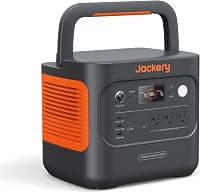
What Is a Portable Power Station? A Plain Buyer's Guide
A portable power station is a rechargeable battery with outlets and ports for powering compatible devices. To choose one, match its output watts to your devices and its watt-hour capacity to the time you need power.
On this page (9 sections)
- What is a portable power station made of?
- What can a portable power station run?
- Which specs matter when choosing a portable power station?
- How large should your portable power station be?
- How do you choose the right portable power station?
- How does portable power station recharging work?
- How do you set up and care for a portable power station?
- Is a portable power station safe to use indoors?
- What is a portable power station buyer's final decision?
A portable power station is a rechargeable battery with outlets and ports that supplies electricity to compatible devices. If you're asking what is a portable power station for an outage, trip or work setup, the key is matching its watt limit to your devices and its stored energy to the hours you need.
It can recharge from a wall outlet, a vehicle or compatible solar panels, depending on the model. It stores electricity in a battery rather than making power by burning fuel.
The right size depends on what you want to run, for how long, and where you'll use the unit. This guide explains the terms, helps you choose a useful size, and compares four examples from a small travel unit to a larger backup station.
What is a portable power station made of?
A portable power station combines a battery, control electronics, outlets and charging inputs in one case. The battery stores energy, and the electronics manage charging and deliver power through the ports.
Many units include AC outlets for household plugs and USB ports for phones and other small devices. Some also have a car-style DC port or an input for solar panels.
The port count alone doesn't tell you whether a station can power a particular device. Check the output type and limits against the device you plan to connect.
What does the inverter do in a portable power station?
An inverter changes the battery's direct-current power into alternating-current power for devices that use a standard AC plug. USB and many DC ports can supply power without using the AC outlets.
The inverter has a watt limit. If the connected load exceeds that limit, a station may shut down or show an overload warning, so check the manual and your device's requirements.
Using AC power can also draw energy as the station converts it from the battery. For small electronics, a compatible USB or DC port may be a more direct way to connect, if the device supports it.
What does watt-hour capacity mean for a portable power station?
Watt-hours, written as Wh, describe how much energy a battery can store. More watt-hours can support a longer runtime, but actual use also depends on the device's power draw and conversion losses.
A 1,000Wh station won't necessarily run a 100W device for exactly 10 hours. Some stored energy is lost during conversion, and a device may draw more or less than its rated power while operating.
For a clearer explanation, read what a watt-hour means, including how watt-hours differ from watts. That distinction is central to choosing a station: watts help answer “Can it run this?” while watt-hours help answer “For how long?”
What can a portable power station run?
A portable power station can run devices whose power needs fit within its output and available capacity. A phone charger may draw little power, while a heating appliance or motor can require much more.
Before plugging in a device, check its running watts and any startup surge. Then consider duration: a station might support a device's watt draw but run out of stored energy before the time you need it.
| Device or use | What to check |
|---|---|
| Phone, tablet or laptop | USB or AC port compatibility and total output |
| LED lights | Watt draw and hours of use |
| Refrigerator or pump | Running watts, startup surge and cycle pattern |
| Heater, kettle or cooking appliance | High watt draw and likely short runtime |
| Multiple devices | Combined watt draw and total energy use |
A device's label or manual is a better guide than its general category. For a device-by-device approach, see what a power station can run.
How do you estimate runtime from portable power station capacity?
Estimate runtime by multiplying the station's watt-hour capacity by about 0.85, then dividing by the device's operating watts. The 0.85 factor allows for conversion losses, so treat the result as a planning estimate, not a guarantee.
For example, a 300Wh station powering a 60W device gives an estimate of about 4.3 hours: 300 × 0.85 ÷ 60. Actual runtime changes with the device's real draw, battery condition and how the station is used.
If you plan to use several devices at once, add their watt draw first. A 60W light and a 40W laptop create an approximate 100W load while both are operating.
For devices that cycle on and off, such as a refrigerator, the average draw over time may differ from the running watt figure. A simple estimate is useful for comparing options, but leave room for changes in use and don't plan an outage around the most optimistic number.
Which specs matter when choosing a portable power station?
Start with output watts for device compatibility and watt-hours for runtime. Then check port types, charging options, weight and features that matter to your situation.
Rated watts and surge watts
Rated watts describe the power a station can supply steadily within its limits. Some devices, especially those with motors, draw more power briefly when starting, so compare startup demand with the station's surge rating.
A peak or surge number isn't the amount a station can supply continuously. Use rated output for steady operation, and confirm that a brief startup load is within the model's stated peak limit.
If multiple devices will run together, add their power needs. A station with enough output for each device individually may still be overloaded by the combined load.
Battery chemistry and cycle claims
Battery chemistry affects a station's design and stated service life. Some brands publish cycle-life figures, but those are manufacturer claims and depend on the conditions behind the figure.
Compare cycle claims with how often you expect to use and recharge the station. A camping unit used occasionally has different demands from a station cycled regularly for home backup.
Cycle life doesn't answer every care question. Follow the model's charging, storage and temperature instructions, and use its own manual for limits that may vary between products.
Ports and charging inputs
Count the devices you may connect at the same time, then check the port mix and each port's limits. A station can have several outlets while still having a total output cap across them.
Charging speed varies by input and conditions. Check the manual for supported wall, vehicle and solar methods, along with compatible panel voltage and connectors.
Think about the cables and adapters you actually need. A port that looks familiar may have different output limits, and a solar connector that fits physically doesn't prove the panel's electrical range is compatible.
Weight and carrying needs
A compact station is easier to move, but usually stores less energy than a larger unit. For travel, consider the weight you can carry alongside your other gear and the runtime you need.
For home backup, a heavier unit may be manageable if it stays in one place. Measure the storage spot, leave access to its ports, and decide how you would move it during an outage.
Portability is more than the number on a scale. Consider whether you'll carry the unit over distance, move it between rooms, or leave it beside the devices it powers.
How large should your portable power station be?
Choose capacity based on the devices you need, their combined watts and the hours of use. A small station can suit phones and laptops, while longer backup periods or higher-draw devices call for more output and stored energy.
The four examples below fit different needs. Their capacity and output figures describe different limits, so compare both rather than choosing by one headline number.
Anker SOLIX C1000 Gen 2: a portable power station for mixed backup
The Anker SOLIX C1000 Gen 2 has 1,024Wh capacity and 2,000W output, with a stated 3,000W peak. Anker says its HyperFlash AC charging can fully recharge it in 49 minutes when enabled, and its solar input supports up to 600W.
Anker says this model has a 10 ms UPS switchover feature for connected equipment. Its capacity isn't expandable, according to Anker, so estimate your runtime needs before choosing it.
Choose it when you want a balance of output and stored energy for a mix of devices, and your combined load fits within 2,000W. Skip it if you expect to need expansion capacity later or if your planned loads require more than its rated output.
Jackery Explorer 300: a compact portable power station for light loads
The Jackery Explorer 300 has a stated 292Wh capacity and 300W rated output. It weighs 7.5 lb and includes two AC outlets, USB ports and a car port.
Jackery says it can recharge from a wall adapter, car port or compatible solar panel. Panels are sold separately, so include a panel only if you plan to use solar charging.
Choose it when low weight matters and your device list is modest. Skip it for a refrigerator, high-draw appliance or long outage plan unless you have confirmed the device's requirements and have a realistic recharge plan.
Bluetti AC180: a portable power station with more capacity
The Bluetti AC180 has a 1,152Wh battery and 1,800W output. Bluetti says it supports a 2,700W power-lifting mode and has a 500W maximum solar input.
Bluetti states that AC charging can reach a full charge in about an hour under its specified 1,440W input conditions. The unit weighs 37.4 lb, so plan for a fixed backup spot or short moves rather than carrying it far.
Choose it when your devices need more output or energy than a compact station provides, and you can keep the unit near where it will be used. Skip it if you need a light pack for long walks or if your device's startup demand exceeds the station's limits.
Anker SOLIX C2000 Gen 2: a larger portable power station for longer use
The Anker SOLIX C2000 Gen 2 has a 2,048Wh battery, 2,400W rated output and 4,000W peak output. Anker says an expansion battery can increase capacity to 4kWh.
Anker says it can recharge fully in 58 minutes using its stated AC and solar charging setup. At 41.7 lb, it's a substantial item to move, so choose its storage and operating location before an outage.
Choose it when you need more stored energy or a higher rated output than the smaller examples offer. Skip it if you need a lightweight carry-on-trip station, or if your appliance requires more than 2,400W of continuous output.
How do you choose the right portable power station?
Choose a unit by matching your real device list to its output and runtime needs. A large battery can't make up for an output rating that's too low, and a high watt rating doesn't guarantee long runtime.
Use this checklist before comparing models:
- List the devices you need during a trip or outage.
- Find each device's running watts and, for motors, startup demand.
- Decide which devices must run at the same time.
- Add their running watts and compare the total with the station's rated output.
- Estimate runtime from watt-hours and total load.
- Check the outlets, ports and charging methods you need.
- Consider weight, storage space and how often you'll move the unit.
- Decide how you'll recharge it if the outage or trip lasts longer than one battery cycle.
Keep the use case fixed when comparing stations. A unit for charging small electronics on a weekend trip has different needs from one intended to run a refrigerator or pump.
For a step-by-step selection method, use our portable power station checklist. To compare battery stations with fuel models, see portable power station vs inverter generator.
Which portable power station suits each buyer?
A small station suits a buyer who values easy carrying and needs to charge modest loads. A mid-size or larger unit suits buyers who need more watt-hours, higher output or a backup location that can hold a heavier battery.
For camping, start with the gear list and how far you must carry it. Phones, lights and a laptop point toward a compact station if their combined draw and desired runtime fit; a heavier load or longer trip may justify more capacity.
For home backup, start with the essential devices rather than trying to power the whole home. List what must stay on, note any startup demand, and decide how many hours matter; then choose output and capacity around those needs.
For remote work, check the computer, monitor, router and any other equipment you want to keep running. Add their draw, account for the hours away from an outlet, and consider whether a UPS feature matters for your setup.
Skip a portable station if your primary goal is to run high-draw appliances for a long time and you can't recharge it during that period. A battery can only supply the energy it has stored, and a larger station may be too heavy or costly for a use that calls for another backup approach.
How does portable power station recharging work?
A portable power station recharges from a supported AC outlet, vehicle connection or solar panel, depending on its inputs. Charging time depends on input power, battery size, temperature and the station's charging limits.
Read the manual before pairing a solar panel with a station. Check the allowed voltage, maximum solar input and connector type, since a panel that plugs in physically may still be electrically incompatible.
The solar input limit caps how much power a station can accept, even if a panel can produce more. Actual solar charging varies with sunlight, panel angle and shading.
Don't assume that a solar panel comes with the station. Check what is included and whether you need to buy a compatible panel and cable separately; for one of these examples, Jackery specifies that its panel is sold separately.
A recharge plan matters as much as battery size during a longer outage. Decide whether you'll use wall power before the outage, vehicle charging, solar, or a combination the station supports, and check how long each method may take under your conditions.
How do you set up and care for a portable power station?
Set up a portable power station by reading its manual, charging it with a supported method, and trying the devices you plan to rely on before an outage or trip. A short practice run can reveal a missing cable, incompatible port or load that exceeds the station's limit.
Keep the station in a dry place with room around it, and follow the maker's instructions for temperature, charging and storage. Avoid leaving it where heat, moisture or a trip hazard could affect normal use.
Label or group the cables you need with the devices they serve. For a home backup setup, keep the station accessible and decide which outlet or port each essential device will use.
Check the battery charge from time to time if the unit is stored for emergencies. Follow the model's storage guidance rather than assuming one charge level or maintenance schedule applies to every battery.
What portable power station mistakes should you avoid?
The most common mistake is choosing a station by watt-hours alone. Capacity estimates runtime, but the rated output determines whether the station can supply the device's power demand.
Another mistake is treating peak watts as a continuous rating. Use rated output for steady operation and check the peak figure only for short startup demand where the device and station guidance support that comparison.
Don't plan around a device's category name. Two refrigerators or pumps can have different power needs, so check the label or manual for the specific item you plan to use.
Avoid connecting a panel based only on plug fit. Verify the voltage range, input limit and connector, then use compatible cables.
Finally, don't count on an unpracticed setup during an outage. Charge the station ahead of time, connect the essential devices, and confirm the arrangement works within the station's limits.
Is a portable power station safe to use indoors?
A battery power station doesn't burn fuel while supplying electricity, but follow the manufacturer's safety instructions for placement and charging. Keep it dry, protect it from heat and use compatible charging equipment.
A fuel-powered generator is different and should never be run indoors or in an enclosed space because its exhaust can be deadly. For more detail on battery units, read using a portable power station indoors.
Don't cover vents or place the unit where it could get wet. Use the operating and charging instructions for the exact model, especially when the station will be unattended or connected to other equipment.
What is a portable power station buyer's final decision?
Choose the Jackery Explorer 300 when low weight and modest device charging matter most. Choose the Bluetti AC180 or Anker SOLIX C1000 Gen 2 when you need more output and capacity, then compare their weight, ports and charging needs against your device list.
Choose the Anker SOLIX C2000 Gen 2 when longer runtime or its higher rated output fits your backup plan, and confirm each appliance's startup and running requirements. The best choice is the smallest station that meets your load and runtime needs with a workable recharge plan.
If you're still deciding between models, start with how to choose a portable power station, then check the exact requirements for each device you plan to run.
Frequently asked questions
What is a portable power station used for?
A portable power station stores electricity in a rechargeable battery and supplies it through outlets and ports. People use one for phones, laptops, lights and other compatible devices while camping, traveling or during an outage.
Check your devices' running watts and estimate how long the station can supply them before relying on it.
Can a portable power station run a refrigerator?
Some portable power stations can run a refrigerator, but compatibility depends on the fridge's running and startup power, the station's output limit and the time you need it to run. Check the appliance label or manual, compare those figures with the station, then estimate runtime from its watt-hour capacity and the fridge's actual power use.
How long will a portable power station last?
Runtime depends on the station's watt-hour capacity, the device's power draw and conversion losses. A rough estimate is watt-hours multiplied by 0.85, divided by device watts.
Real use can vary.
For multiple devices, add their power draw and estimate runtime from the combined load.
Can you use a portable power station indoors?
A battery power station does not burn fuel while supplying power, but follow its manual for placement, charging and ventilation. Keep it dry and away from heat.
Don't confuse it with a fuel-powered generator, which can create dangerous exhaust.
Read the safety instructions for your specific station before indoor use.
Is a portable power station the same as a solar generator?
A portable power station is the battery unit that stores and supplies power. The term solar generator usually means a power station paired with solar panels, though naming varies by brand.
Check whether panels are included, what solar input the unit accepts and whether the panel connector is compatible.