EcoFlow vs Anker SOLIX: Which Is Better for Backup? (October 2026)
For EcoFlow vs Anker backup power, choose Anker SOLIX C1000 Gen 2 for higher rated output, or EcoFlow Delta 3 Classic for Storm Alert in its app. Both have 1,024Wh capacity.
On this page (9 sections)
- EcoFlow vs Anker: which is better for backup?
- How do the EcoFlow and Anker capacities compare?
- Which one charges faster?
- Which station is easier to move and store?
- What about expansion and longer backup plans?
- How should you set up a station for backup?
- What common buying and use mistakes should you avoid?
- How should you choose between EcoFlow and Anker?
- Verdict: EcoFlow vs Anker for home backup
For EcoFlow vs Anker backup power, choose Anker SOLIX C1000 Gen 2 for higher rated output, or EcoFlow Delta 3 Classic for Storm Alert in its app. Both have 1,024Wh capacity and claim UPS transfer under 10ms.
The Delta 3 Classic is rated at 1,800W, while the C1000 Gen 2 is rated at 2,000W. Their capacities match, so the practical choice comes down to the appliances you want to run, how long you need them powered and which app features matter to you.
EcoFlow Delta 3 Max is a larger step up in capacity, with 2,048Wh and 2,400W rated output. It suits a backup plan that needs more stored energy, but the extra capacity only helps if you also have a way to recharge it and a place to keep it.

EcoFlow vs Anker: which is better for backup?
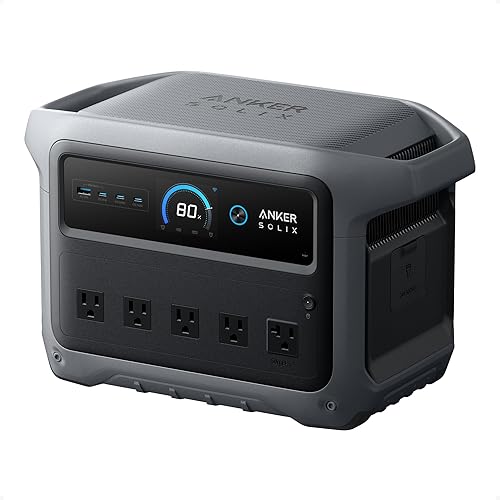
Anker SOLIX C1000 Gen 2 is the better fit when you need more rated output from a 1,024Wh station; EcoFlow Delta 3 Classic stands out for its Storm Alert app mode. The right choice depends on your load plan, not the logo.
Anker rates the C1000 Gen 2 at 2,000W with a 3,000W peak. EcoFlow rates the Delta 3 Classic at 1,800W with a 3,600W surge, and says X-Boost can raise output up to 2,600W for heavier loads.
These figures use different output terms and modes. Check each appliance's continuous draw and startup demand, and don't treat a peak or boost number as the same as normal rated output.
Which EcoFlow or Anker feature matters most during an outage?
The C1000 Gen 2 has 10 ports and supports Anker app Time-of-Use mode. The Delta 3 Classic app includes Storm Alert and Self-Powered Mode, along with usage monitoring and charging schedules.
Both products claim UPS transfer under 10ms. That can matter for sensitive electronics, but it doesn't confirm that a particular device will work correctly through every transfer.
Check your device's power needs and guidance before treating a portable station as a replacement for a dedicated backup system. A UPS label or transfer-time figure alone doesn't answer every compatibility question.
If you're still deciding what size suits your home, our portable power station checklist covers capacity, output and load planning. For a broader comparison of brand tradeoffs, see EcoFlow vs Bluetti.
How do the EcoFlow and Anker capacities compare?
The Delta 3 Classic and C1000 Gen 2 each have 1,024Wh capacity; the Delta 3 Max has 2,048Wh. Capacity is stored energy, while wattage describes the load a station can supply at once.
A 1,024Wh rating doesn't mean an appliance drawing 1,024W will run for exactly one hour. Conversion losses and changing loads affect usable runtime, so treat capacity as a comparison point rather than a runtime guarantee.
The Delta 3 Max has twice the capacity of the other two. It may suit a plan with more devices or longer use, but first check whether its rated output and ports fit your needs.
Start with a list of the devices you consider essential. Add their expected hours of use, then account for the fact that batteries don't deliver every watt-hour as usable AC energy.
Our plain guide to watt-hours explains how capacity differs from watts. For examples of devices a station can handle, see what a portable power station can run.
Which one charges faster?
EcoFlow gives the Delta 3 Classic a 45-minute figure to reach 80% on AC; Anker gives the C1000 Gen 2 a 49-minute full-charge figure. Those measurements cover different portions of the charge, so neither number proves which one is faster at every level.
Anker's UltraFast charging uses HyperFlash at up to 1,600W and must be enabled in the Anker app. Anker notes that charging speed depends on battery temperature, and charging slows noticeably when cell temperature is between 0°C and 20°C.
EcoFlow says the Delta 3 Classic can fully recharge in 2.5 hours with an optional 500W solar panel. Anker says the C1000 Gen 2 can recharge in 1.8 hours with 600W of solar, up to 60V maximum.
Solar estimates depend on having a compatible panel, enough sun and suitable conditions. If solar is part of your outage plan, check the panel's voltage and input limits before connecting it.
EcoFlow says the Delta 3 Max reaches 80% on AC in 1.13 hours. The product information here doesn't specify its solar charging time, so compare the exact charging method you plan to use.
For a practical estimate, read how long a portable power station takes to charge. If you plan to power devices while charging, see using a station while it charges.
Which station is easier to move and store?
The two 1,024Wh models are the closer comparison for room-to-room backup; the Delta 3 Max offers more capacity. Check dimensions and weight against your storage spot and the path you may need to carry the station through.
The Delta 3 Classic weighs 26.7 lb and measures 7.9 x 11.1 x 15.7 in. The C1000 Gen 2 weighs 11.3 kg, about 24.9 lb, and measures 15.1 x 8.2 x 9.6 in.
The C1000 Gen 2 is slightly lighter by those figures, though its shape is different. Measure shelf height, doorways and the room where you'll store it, and leave enough room to reach the controls and ports.
The Delta 3 Max measures 9.4 x 12 x 19.44 in. Its weight isn't stated here, so check it before planning to carry the station often.
A portable power station is easiest to use when it's positioned before an outage, with its charging cable and the devices you plan to connect close at hand. Pick a dry, stable spot with airflow, and avoid blocking its vents.
What about expansion and longer backup plans?
Anker says the C1000 Gen 2 has no expansion feature. EcoFlow says the Delta 3 Classic isn't compatible with the Delta 2 Smart Extra Battery or Delta 3 Series Smart Extra Battery.
That makes a capacity decision more important up front. If a longer outage is a concern, estimate the daily energy needed by the devices you want powered, then decide whether a larger station, solar recharging or another backup source fits your plan.
Don't assume the Delta 3 Classic supports an EcoFlow battery because another model in the brand's range does. Check compatibility for the exact station and battery combination before buying any extra equipment.
The EcoFlow Delta 3 Classic review looks at that model in more detail. For a different Anker capacity class, see our Anker SOLIX S2000 review.
How should you set up a station for backup?
Charge the station before an outage, learn its app controls and test your connection plan with low-risk devices. Keep the unit where you can reach its outlets, see its screen and move it if needed.
For the Delta 3 Classic, install the EcoFlow app if you want to monitor use, set charging schedules or use Storm Alert and Self-Powered Mode. For Anker, enable HyperFlash in the app if you want its fast AC charging mode, and choose Standard or Time-of-Use mode for its charging and discharging behavior.
Before an outage, plug in the devices you expect to use and check that their combined draw stays within the station's normal output rating. For appliances with motors, such as refrigerators and pumps, check startup demand as well as running watts.
Keep a short priority list: communications and lights first, then any comfort or kitchen loads you have confirmed fit. Avoid assuming that several appliances can run together just because each one works on its own.
If a station is connected to a home circuit or transfer equipment, follow the device and electrician guidance for that setup. Don't feed power into household wiring through a regular outlet.
What common buying and use mistakes should you avoid?
The most common mistake is choosing by capacity alone. A station needs enough stored energy for the hours you want and enough output for the devices running at the same time.
Don't compare Anker's 3,000W peak directly with EcoFlow's 3,600W surge as if either were the everyday output. Use rated output for continuous loads, then check appliance startup requirements and the manufacturer's notes about any boost mode.
A second mistake is assuming fast charging will always reach the advertised time. Charging mode, battery temperature, solar conditions and the amount of energy being replenished all affect the wait.
A third mistake is planning to add a battery later without checking compatibility. The C1000 Gen 2 has no expansion feature, and the Delta 3 Classic excludes specific EcoFlow extra batteries.
Finally, don't leave the station's care to the day the power goes out. Keep it clean and dry, store it according to its instructions, and periodically check that it has charge and that the cables and planned devices are ready.
How should you choose between EcoFlow and Anker?
Pick the C1000 Gen 2 for 2,000W rated output and 10 ports; pick the Delta 3 Classic for Storm Alert and its stated 45-minute 0–80% AC charge. Choose Delta 3 Max if its larger capacity and higher rated output better match your backup plan.
Choose the Anker C1000 Gen 2 if your priority is more rated output in a roughly 1,000Wh class, with 10 ports and app Time-of-Use mode. Skip it if you know you'll want expansion later, since this model doesn't support an extra battery.
Choose the EcoFlow Delta 3 Classic if you want Storm Alert and Self-Powered Mode in the app, and its output is enough for your loads. Skip it if your plan depends on one of the extra batteries it doesn't support or if you need more than its rated output.
Choose the EcoFlow Delta 3 Max if your plan calls for 2,048Wh capacity and 2,400W rated output. Skip it if a smaller station already covers your needs or you need a published weight before deciding whether it suits frequent carrying.
Before buying, list the devices you want to run at the same time. Add their running watts, check startup demand for motor-driven appliances, and estimate how long each load must stay on.
Then decide how you'll recharge after use. AC and solar charging, along with app controls, matter only when they fit your routine and outage plan.
Our storm backup guide can help you prioritize essential loads, while best 2000W portable power stations compares other options in that output class.
Verdict: EcoFlow vs Anker for home backup
Choose Anker SOLIX C1000 Gen 2 if your plan needs its 2,000W rated output; choose EcoFlow Delta 3 Classic if Storm Alert is more useful to you. Choose Delta 3 Max when you need its greater capacity for the loads and duration you have in mind.
The better choice comes from matching output, stored energy and charging to a real list of devices. For another close 1,000Wh-class comparison, read Jackery Explorer 1000 v2 vs Anker SOLIX C1000 Gen 2.
Frequently asked questions
Is EcoFlow or Anker better for a home power outage?
Anker SOLIX C1000 Gen 2 has the higher rated output of the 1,024Wh pair at 2,000W, compared with 1,800W for EcoFlow Delta 3 Classic. EcoFlow offers Storm Alert in its app.
Choose by the appliances you need to run, and check their running and startup watts before relying on either station.
Do the EcoFlow Delta 3 Classic and Anker C1000 Gen 2 have the same capacity?
Yes. Both have 1,024Wh capacity.
Capacity describes stored energy, while output describes the load the station can supply at a time.
Runtime depends on appliance draw and conversion losses, so capacity alone can't promise a specific number of hours.
Which charges faster, EcoFlow Delta 3 Classic or Anker C1000 Gen 2?
EcoFlow gives a 45-minute figure to charge from 0–80% on AC, while Anker gives a 49-minute figure for a full AC charge. Those are different charge ranges, so they aren't a direct comparison.
Anker also notes that cell temperature affects its UltraFast charging speed.
Can you expand the Anker SOLIX C1000 Gen 2?
No. Anker says it removed the expansion feature to reduce the C1000 Gen 2's size and weight.
If you may need more stored energy later, compare your capacity needs with a larger station before buying.
EcoFlow Delta 3 Classic also has specific extra-battery incompatibilities.
Can either power station act as a UPS?
Both the Delta 3 Classic and C1000 Gen 2 claim a UPS transfer time under 10ms. That doesn't confirm compatibility with every computer, medical device or other sensitive load.
Check the exact device's power needs and follow its manufacturer's guidance before relying on backup switching.