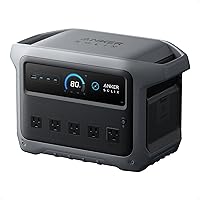
Jackery Explorer 1000 v2 vs Anker SOLIX C1000 Gen 2: Which Is Better? (October 2026)
For Jackery Explorer 1000 v2 vs Anker SOLIX C1000 Gen 2, choose Anker for higher output and UPS backup, or Jackery for lighter carry and slightly more capacity. Start by checking your devices’ running and startup watts.
On this page (10 sections)
- Jackery Explorer 1000 v2 vs Anker SOLIX C1000 Gen 2: which should you choose?
- How do output and capacity compare?
- Which one is easier to carry?
- How fast can you recharge them?
- Which backup features matter at home?
- Does the Anker C1000 Gen 2 improve on the original C1000?
- Who should buy each power station?
- How should you set up and care for one?
- What are the most common buying mistakes?
- What is the final decision for Jackery Explorer 1000 v2 vs Anker SOLIX C1000 Gen 2?
For Jackery Explorer 1000 v2 vs Anker SOLIX C1000 Gen 2, choose Anker for higher output and UPS backup, or Jackery for lighter carry and slightly more capacity. Start by checking the running and startup watts of the devices you need to power.
The Anker provides 2,000W of continuous output, compared with 1,500W for the Jackery. Their capacities are close, so the deciding factors are usually load, carry weight, charging preferences and backup features.
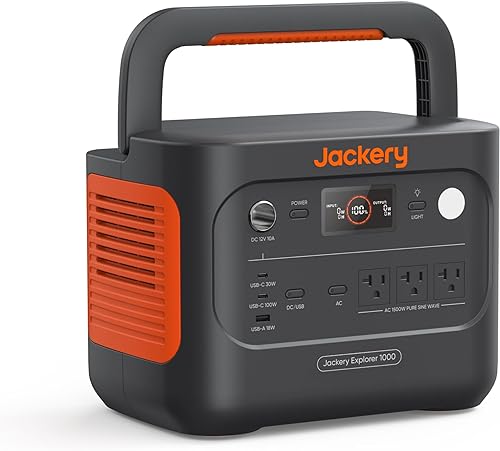
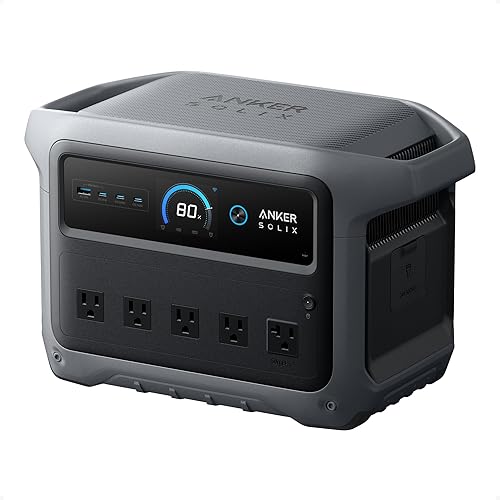
Jackery Explorer 1000 v2 vs Anker SOLIX C1000 Gen 2: which should you choose?
Pick the Anker Gen 2 if your planned devices need more than 1,500W of continuous output; pick the Jackery if lower weight and slightly more capacity matter more. Both are around 1kWh, but their output and backup features differ.
The Jackery has 1,070Wh capacity and 1,500W AC output. The Anker Gen 2 has 1,024Wh capacity and 2,000W output.
That 46Wh capacity difference is small beside the effect of your appliances and the time they run. A higher output rating lets you run a larger combined load, but it does not mean you’ll get longer runtime.
Make a list of the devices you expect to use together. Add their running watts, then check the startup needs for anything with a motor or compressor.
If your planned load exceeds a station’s continuous output, choose another setup or reduce the number of devices running at once.
How do output and capacity compare?
The Anker Gen 2 has higher continuous output, while the Jackery has slightly more stored energy. Output helps determine which devices can run together; capacity helps estimate how long a compatible load may run.
The Jackery is rated for 1,500W AC output with a 3,000W surge peak. The Anker Gen 2 offers 2,000W output and a 3,000W peak.
The matching peak figures do not make their continuous output equal. If a device draws more than 1,500W while operating, that load exceeds the Jackery’s rating, even if its startup draw briefly fits within the peak.
Capacity is measured in watt-hours. The Anker’s 1,024Wh and Jackery’s 1,070Wh give you a rough way to compare stored energy, but real runtime depends on the device load and conversion losses.
Our watt-hour guide explains the difference between watts and watt-hours.
What can each 1kWh power station run?
Either station can suit devices whose combined running draw stays within its output rating, but the Anker allows a higher total load. Check the labels or manuals for your equipment before connecting it.
A refrigerator, electric pot and electronics can have different running and startup demands. Write down the devices that matter most during an outage and use their power requirements to decide what can run together.
Avoid estimating from a device’s name or category. Two appliances that sound similar can draw different amounts of power, and motors or compressors may need extra power when they start.
Our guide to what a 1000W power station can run gives a practical way to match loads to output and capacity. For one common appliance question, see how to run a window air conditioner from a power station.
Which one is easier to carry?
The Jackery is the lighter choice, but both stations are substantial to carry over distance. It weighs 23.8 lb, while the Anker Gen 2 weighs about 24.9 lb.
That difference can matter when lifting a station into a vehicle or moving it between rooms. The Jackery’s foldable handle gives you a place to grip it, but weight still matters if you plan to carry it through a campground or up stairs.
The Anker Gen 2 weighs 11.3 kg, which is about 24.9 lb. Its weight is close to the Jackery’s, so base your decision on the small difference only if you expect frequent lifting.
The original Anker SOLIX C1000 weighs 27.6 lb, making it the heaviest of these three options. It comes with a car charging cable, which can suit a travel setup if its weight and output work for your needs.
How fast can you recharge them?
Both brands describe fast AC charging, but their fastest modes require app settings. Treat the quoted times as mode-dependent claims, not a promise for every charging session.
Jackery says the Explorer 1000 v2 can charge from empty to full in 1 hour with emergency charging enabled through its app. Its default charging mode takes 1.7 hours, which Jackery says is intended to support battery health.
Anker says the C1000 Gen 2 can fully recharge in 49 minutes at 1,600W with HyperFlash enabled in the Anker app. The charging speed depends on battery cell temperature and may slow when the cells are below 20°C.
A common mistake is to plug in and expect the fastest time without enabling the relevant mode. Before an outage, learn where the charging settings are in the app and confirm that the selected mode matches your priorities.
The original C1000 claims a full charge in under an hour with UltraFast recharging enabled. Its 43-minute figure applies to a charge from empty to 80% under stated conditions.
Which backup features matter at home?
The Anker Gen 2 has a stated UPS switchover feature, while the Jackery offers a quiet overnight charging mode. Choose the feature that matches your equipment and routine.
Anker states that the C1000 Gen 2 has under 10 ms UPS switchover for equipment such as CPAP machines and laptops. Check the manuals for both the equipment and power station before relying on it for critical use.
The Jackery app includes a 30 dB quiet overnight charging mode, an energy efficiency mode and emergency charging. These settings help tailor charging to the time of day and the need for speed.
Place a station on a stable, dry surface with room around it, and keep its vents clear. Before an outage, charge it, confirm that it powers the devices you need, and store the cables where you can reach them.
If a sump pump is part of your backup plan, check its running and startup draw before choosing a station. Our guide to power stations for sump pumps explains why those figures matter.
Does the Anker C1000 Gen 2 improve on the original C1000?
The Gen 2 offers higher output and peak power, while the original C1000 includes a car charging cable. Anker says the Gen 2 removed expansion support to reduce size and weight.
The Gen 2 has 2,000W output and a 3,000W peak. The original C1000 has 1,800W output, a 2,400W peak and 1,056Wh capacity.
The original model includes a car charging cable. The Gen 2 package includes the station, AC charging cable, quick start guide, and safety and warranty card.
Anker recommends the original C1000 for buyers who need expansion. Check the model name carefully before choosing, since the names are similar and the Gen 2 does not retain that feature.
Who should buy each power station?
Choose the Jackery for portability and the Anker Gen 2 for higher output or its stated UPS function. Skip both if your equipment needs more than their output or you need substantially more stored energy.
The Jackery Explorer 1000 v2 suits a buyer who moves a station between a car, camp and home, or who wants slightly more capacity in a lighter unit. It is a poor fit for a planned continuous load above 1,500W or for a solar setup that relies on panels outside Jackery’s compatible range.
The Anker SOLIX C1000 Gen 2 suits someone with a higher combined running load, or someone who values its stated UPS switchover. Skip it if you require an expandable battery setup, since Anker says the Gen 2 removed expansion support.
The original Anker SOLIX C1000 suits buyers who need its included car charging cable or expansion support and can work within 1,800W output. It is heavier than the other two, so it is less appealing when moving the station often is a priority.
A 1kWh class station may also be the wrong size if you need to run large appliances for long periods without a way to recharge. Estimate both the load and the runtime before buying, and consider a larger station if your needs exceed this class.
How should you set up and care for one?
Charge the station before you need it, learn its app controls, and test your planned setup with ordinary household loads. A little preparation helps avoid mistakes when power is already out.
Start by reading the manual and identifying the AC, USB and DC outputs you plan to use. Charge the unit from a suitable source, install its app if you want app-controlled modes, and confirm you can change settings before an emergency.
Keep a simple list of essential devices and their power needs with the station. During an outage, connect the highest-priority items first and avoid adding appliances until you know the remaining output and capacity are sufficient.
Do not leave charging modes as an afterthought. The Jackery’s one-hour mode requires emergency charging in the app, and the Anker Gen 2’s UltraFast mode also needs to be enabled in its app.
For solar charging, check compatibility before buying panels. The Jackery is compatible only with Jackery solar panels, while the Anker Gen 2 supports up to 600W of solar input.
What are the most common buying mistakes?
The biggest mistakes are choosing by peak watts alone, overlooking app settings and assuming close capacity means identical runtime. Check the continuous output, device draw and charging plan before you decide.
First, don’t treat a 3,000W peak as the amount the station can supply continuously. Both the Jackery and Anker Gen 2 list that peak, but their continuous ratings differ by 500W.
Second, don’t choose only by watt-hours. The Jackery has slightly more capacity, but a load that exceeds its 1,500W output still won’t be a match.
Third, don’t assume a fast charge happens automatically. Learn the app controls and understand the default mode before you need to recharge quickly.
Finally, don’t buy solar panels based only on connector appearance or a general claim of compatibility. Confirm that the panel works with your specific station and its supported input.
What is the final decision for Jackery Explorer 1000 v2 vs Anker SOLIX C1000 Gen 2?
Pick the Jackery if lower weight and slightly more capacity fit your plan; pick the Anker Gen 2 if you need up to 2,000W of continuous output or value its stated UPS switchover. Choose the original C1000 only when its car cable or expansion support is useful.
For the Jackery versus Anker Gen 2 choice, match the station to your device list first. Then use weight, solar compatibility and backup features to settle the decision.
If you are still unsure, use how to choose a portable power station to work through load and runtime, then compare other options in our 1000W power station guide.
Frequently asked questions
Is the Jackery Explorer 1000 v2 better than the Anker SOLIX C1000 Gen 2?
The Jackery fits buyers who want a lighter station and slightly more capacity. The Anker Gen 2 fits loads that need more continuous output or a stated UPS switchover.
Compare your devices’ running and startup watts first, then decide whether weight or output matters more for your setup.
Which has more power, Jackery 1000 v2 or Anker C1000 Gen 2?
The Anker SOLIX C1000 Gen 2 has higher continuous output at 2,000W, compared with 1,500W for the Jackery Explorer 1000 v2. Both list a 3,000W peak, but peak output is not the same as continuous output.
Check your appliances’ running and startup needs.
Which power station is lighter?
The Jackery Explorer 1000 v2 weighs 23.8 lb. The Anker SOLIX C1000 Gen 2 weighs 11.3 kg, about 24.9 lb, so the difference is about 1.1 lb.
That can help when lifting either unit into a car or moving it between rooms.
Can the Anker SOLIX C1000 Gen 2 run a UPS?
Anker states that the C1000 Gen 2 has under 10 ms UPS switchover for equipment such as CPAP machines and laptops. Check your equipment’s manual and the power station manual before relying on it for critical equipment, since device behavior during a transfer can vary.
Does the Jackery Explorer 1000 v2 include a solar panel?
No. The Explorer 1000 v2 package includes the power station and user manual, while a solar panel is optional.
Jackery states that this model is compatible only with Jackery solar panels for solar charging, so check panel compatibility before buying a panel separately.