10 Best Solar Generator Kits: Power Stations With Panels (October 2026)
The best solar generator kits include the Jackery Solar Generator 1000 v2 with 200W Panel for home and camp, the Anker SOLIX C1000 Gen 2 with 200W Panel for higher output, and the Bluetti Elite 100 V2 Solar Generator with 200W Panel for quiet backup.
On this page (8 sections)
- Best solar generator kits by use
- How we chose these solar generator kits
- Solar generator kit comparison
- What should you check before choosing the best solar generator?
- Which solar generator kit fits each buyer?
- How do you set up and care for a solar generator?
- What mistakes should you avoid with solar generator kits?
- Which is the best solar generator for your needs?
The best solar generator kit for most buyers is the Jackery Solar Generator 1000 v2 with 200W Panel, pairing 1,070Wh of capacity with 1,500W AC output. For more stored energy, choose a roughly 2kWh kit; for phones and laptops, a smaller DC setup can be easier to carry.
A solar generator is a battery power station with panels that recharge it from sunlight. The term doesn't mean the kit will power every appliance or recharge quickly in every setting, so compare output, capacity and panel wattage with the job you have in mind.
For a plain explanation of the two terms, read portable power station vs solar generator. If you're new to battery power, our portable power station buyer's guide covers the basics.
Our picks at a glance
-
1
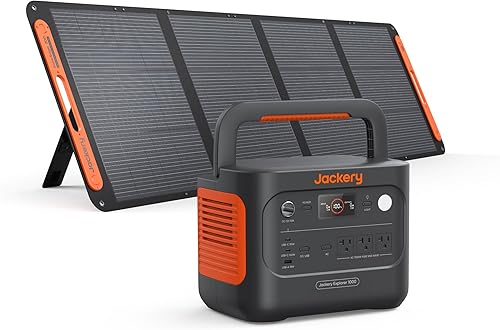 Best for home and camp
Jackery Solar Generator 1000 v2 with 200W Panel
8.8/10 our score
See it on Amazon -
2

-
3
 Best for quiet backup
Bluetti Elite 100 V2 Solar Generator with 200W Panel
8.6/10 our score
See it on Amazon
- 4
 Check it
Anker SOLIX S2000 with 400W Panel
Best for longer fridge backup - 5
 Check it
Jackery Explorer 2000 v2 with 2x200W Panels
Best for two-panel backup - 6
 Check it
Bluetti AC180 Solar Generator with 200W Panel
Best for extra outlets - 7
 Check it
Anker SOLIX C2000 Gen 2 with 200W Panel
Best for added capacity - 8
 Check it
Anker SOLIX C300 DC with 60W Panel
Best for personal electronics - 9
 Check it
EcoFlow River 3 Plus with 45W Panel
Best for small UPS setups - 10
 Check it
OUPES Mega 1 Solar Generator with 100W Panel
Best for expandable off-grid use
Best solar generator kits by use
The Jackery 1000 v2 leads this list for buyers who want a middle-ground station for home essentials and camp use. The other kits cover higher output, more stored energy, quiet operation, and small-device charging.
Jackery Solar Generator 1000 v2 with 200W Panel: Best for home and camp
- 1,070Wh capacity
- 1,500W AC output
- 200W solar panel included
- 23.8 lb station
This kit pairs a 1,070Wh station with a 200W panel. Its 23.8 lb station is lighter than the larger-capacity picks.
Pros
- 1,070Wh capacity and 1,500W AC output
- Station weighs 23.8 lb
- Emergency AC charging can reach full charge in 1 hour when enabled in the app
Cons
- A 200W panel charges the station to 80% in 6 hours
- Station and panel ship separately
Anker SOLIX C1000 Gen 2 with 200W Panel: Best for higher output
- 1,024Wh capacity
- 2,000W output
- 200W solar panel included
- 9 ports
The C1000 Gen 2 offers 2,000W output and 1,024Wh capacity, with a 200W panel in the kit. Its 9 ports suit buyers who want more output in this capacity class.
Pros
- 2,000W output and 3,000W peak
- 9 ports
- Under-10 ms UPS switchover
Cons
- Panel and station ship separately
- The 1.8-hour solar full-charge estimate uses 600W input
Bluetti Elite 100 V2 Solar Generator with 200W Panel: Best for quiet backup
- 1,024Wh capacity
- 1,800W rated AC output
- 200W solar panel included
- 30 dB silent mode
The Elite 100 V2 combines a 200W panel with 1,024Wh capacity and a 30 dB silent mode. Its 1,800W rated AC output and under-10 ms UPS switchover suit backup for selected devices.
Pros
- 1,800W rated AC output
- Silent mode rated at 30 dB
- Under-10 ms UPS switchover
Cons
- The panel is 200W
- Station and panel ship separately
Anker SOLIX S2000 with 400W Panel: Best for longer fridge backup
- 2,010Wh capacity
- 1,500W continuous output
- 400W solar panel included
- 8 outlets
The S2000 pairs a 2,010Wh station with a 400W panel, giving buyers more stored energy and panel capacity than the roughly 1kWh kits. Check appliance wattage against its 1,500W continuous output.
Pros
- 2,010Wh capacity
- 400W panel included
- Under-10 ms UPS switchover
Cons
- Continuous output is 1,500W
- Station and panel ship separately
Jackery Explorer 2000 v2 with 2x200W Panels: Best for two-panel backup
- 2,042Wh capacity
- 2,200W AC output
- Two 200W panels included
- 39.5 lb station
The Explorer 2000 v2 has 2,042Wh capacity and comes with two 200W panels. It suits buyers seeking more stored energy and a multi-panel setup for backup or camping.
Pros
- 2,042Wh capacity and 2,200W output
- Two 200W panels included
- 20 ms UPS switching
Cons
- Station weighs 39.5 lb
- Station and panels may ship separately
Bluetti AC180 Solar Generator with 200W Panel: Best for extra outlets
- 1,152Wh capacity
- 1,800W output
- 200W solar panel included
- 11 outlets
The AC180 provides 1,152Wh capacity, 1,800W output and 11 outlets with a 200W panel in the kit. Its capacity is slightly above 1kWh.
Pros
- 1,152Wh capacity
- 11 outlets
- UPS backup in 20 ms
Cons
- A 200W panel takes 4.8 to 9.6 hours for a full charge
- Station and panel ship separately
Anker SOLIX C2000 Gen 2 with 200W Panel: Best for added capacity
- 2,048Wh capacity
- 2,400W rated output
- 200W bifacial panel included
- Expandable to 4kWh
The C2000 Gen 2 pairs a 2,048Wh station with a 200W bifacial panel and can expand to 4kWh with an expansion battery. It suits buyers who may want additional capacity later.
Pros
- 2,048Wh capacity
- 2,400W rated and 4,000W peak output
- Expandable to 4kWh
Cons
- Station and panel ship separately
- The panel is 200W
Anker SOLIX C300 DC with 60W Panel: Best for personal electronics
- 288Wh capacity
- 300W output
- 60W solar panel included
- 7 device charging ports
The C300 DC pairs 288Wh capacity with a 60W panel for charging phones, cameras and laptops. Its ports provide DC output for electronics.
Pros
- 60W panel included
- Two 140W USB-C ports
- Reaches 80% charge in 50 minutes from a wall outlet
Cons
- No AC output
- Not compatible with Anker PS30, PS200 or PS400 panels
EcoFlow River 3 Plus with 45W Panel: Best for small UPS setups
- 286Wh capacity
- 600W steady output
- 45W solar panel included
- Under-10 ms UPS switchover
The River 3 Plus kit combines a 286Wh station with a 45W panel and under-10 ms UPS switchover. Its 600W steady output fits selected small devices.
Pros
- Under-10 ms UPS switchover
- 600W steady output
- Can expand to 858Wh with compatible batteries
Cons
- The included panel is 45W
- The stated solar charge time is 7.3 hours
OUPES Mega 1 Solar Generator with 100W Panel: Best for expandable off-grid use
- 1,024Wh capacity
- 2,000W AC output
- 100W solar panel included
- Expandable to 5,120Wh
The Mega 1 offers 1,024Wh capacity and 2,000W output, with a 100W panel included and expansion up to 5,120Wh using two B2 Extra Batteries. Its included panel is smaller than most here.
Pros
- Expandable to 5,120Wh with two B2 Extra Batteries
- 2,000W AC output
- 13 ports
Cons
- Included panel is 100W
- Charging estimates depend on the stated charging setup and conditions
How we chose these solar generator kits
We compared capacity, output, panel size, ports, weight and stated charging features against common needs such as selective home backup, camping and small-device charging. The scores reflect how each setup fits those needs, including the tradeoff between a compact station and longer runtime.
Capacity and output answer different questions. Watt-hours describe stored energy, while watts indicate the load a station can support at once, so check both before matching a unit to appliances.
Panel ratings also need context. A panel's wattage is a peak rating under suitable conditions, and the station's solar input limit, sun angle, shade and weather affect the energy it can deliver.
Solar generator kit comparison
Compare the station's capacity and output with the included panel before choosing. Panel wattage indicates potential input, not constant power through the day.
| Product | Best for | Capacity | AC output | Panel | Our score |
|---|---|---|---|---|---|
| Jackery Solar Generator 1000 v2 with 200W Panel | home and camp | 1,070Wh | 1,500W | 200W | 8.8 |
| Anker SOLIX C1000 Gen 2 with 200W Panel | higher output | 1,024Wh | 200W | 8.7 | |
| Bluetti Elite 100 V2 Solar Generator with 200W Panel | quiet backup | 1,024Wh | 1,800W | 200W | 8.6 |
| Anker SOLIX S2000 with 400W Panel | longer fridge backup | 2,010Wh | 400W | 8.5 | |
| Jackery Explorer 2000 v2 with 2x200W Panels | two-panel backup | 2,042Wh | 2,200W | 8.4 | |
| Bluetti AC180 Solar Generator with 200W Panel | extra outlets | 1,152Wh | 200W | 8.3 | |
| Anker SOLIX C2000 Gen 2 with 200W Panel | added capacity | 2,048Wh | 200W bifacial | 8.2 | |
| Anker SOLIX C300 DC with 60W Panel | personal electronics | 288Wh | 60W | 8.0 | |
| EcoFlow River 3 Plus with 45W Panel | small UPS setups | 286Wh | 45W | 7.8 | |
| OUPES Mega 1 Solar Generator with 100W Panel | expandable off-grid use | 1,024Wh | 2,000W | 100W | 7.7 |
What should you check before choosing the best solar generator?
Start with the devices you need to run, the length of time you need them, and how you'll recharge the station. This turns a broad search for the best solar generator into a practical size and panel choice.
How much output does a solar generator need?
Add the running watts of devices you may use together, then check startup demand for anything with a motor or compressor. The station must support both the combined load and any short surge when an appliance starts.
For example, a refrigerator and a laptop can share a station only if their combined draw stays within its continuous output and the refrigerator's startup demand is within its surge limit. Leave headroom for appliances whose actual draw changes as they cycle.
A model's large surge figure doesn't raise its continuous rating. The Anker SOLIX S2000, for instance, is rated for 1,500W continuous output and 3,000W peak, so it is a poor match for a steady load above 1,500W even if that load starts below its peak limit.
If you are comparing inverter sizes for typical household loads, see our guide to 1000W portable power stations for home use. Treat a category label as a starting point, then check the specific appliance's running and startup watts.
How much capacity will cover your planned runtime?
Estimate energy use by multiplying a device's watts by the hours you expect to use it. A 100W device running for 5 hours uses about 500Wh before conversion losses, so a station with 500Wh of capacity would not provide a full 5 hours in practice.
Battery capacity is a reserve, not a guaranteed runtime. Inverter losses, device cycling, temperature and other connected loads reduce the energy available at the outlet.
The roughly 1kWh models in this roundup fit selective use, such as charging electronics, running lights and keeping a few essentials powered for a limited period. The roughly 2kWh models provide a larger reserve for longer use, but they still cannot power every home circuit at once.
For help reading appliance energy labels and comparing watt-hours with watts, see what a watt-hour means. If you need backup for a particular appliance, estimate its daily use instead of relying on a broad runtime promise.
What panel size makes sense?
A larger panel can replenish a station faster when the sun is strong and the station accepts that much input. The included panels in this roundup range from 45W to 400W, so the charging setup differs sharply between models.
A 45W or 60W panel is a modest companion for a small station and electronics. It won't quickly refill a roughly 1kWh or 2kWh battery from empty, so buyers who need regular solar recovery should look at the panel size and compatible input limit before choosing.
The 200W kits are more versatile for routine outdoor charging, but real output varies through the day. A 400W panel gives the Anker S2000 more solar collection potential, though shade, clouds, panel angle and the station's input ceiling still set the pace.
The OUPES Mega 1 includes a 100W panel alongside 1,024Wh of capacity. That pairing can be useful if expansion is the priority and you already have a plan for a larger compatible array.
However, the included panel alone is a slower way to replenish that battery. Our portable power station solar panel guide explains panel matching.
Should you choose a kit with more than one panel?
A multi-panel kit is useful when you can place panels in direct sun and want more potential charging input. The Jackery Explorer 2000 v2 includes two 200W panels, which gives it a more substantial solar setup than a single small panel.
More panels take more room to carry and position. Think through where the panels will sit during use, how you'll keep their cables clear of foot traffic, and whether you can move them as the sun shifts.
Check the station's solar input limits and connector requirements before adding panels beyond what comes in the kit. A panel's rated output doesn't guarantee the station will accept the full amount, and incompatible connectors or voltage can prevent charging.
How much weight and space can you manage?
A station that stays in one room can be heavier than one you carry to a campsite or move between a car and a picnic area. Consider the station and panels as separate pieces of gear, including where you'll store them and how far you'll carry them.
The Jackery 1000 v2 weighs 23.8 lb, while the Jackery Explorer 2000 v2 weighs 39.5 lb and the Anker S2000 weighs 35.7 lb. That difference matters if you expect to lift the station often, even if the higher-capacity models better match your energy needs.
A heavier unit may still make sense for stationary home backup. If you need frequent portability, decide how much capacity you can realistically move before paying for energy you may leave behind.
Which solar generator kit fits each buyer?
The right kit depends on whether you value easy carrying, higher output, longer runtime, or a smaller setup for electronics. Choose the smallest station that covers your actual loads with room for startup demand and conversion losses.
Is the Jackery 1000 v2 the best solar generator for mixed use?
The Jackery Solar Generator 1000 v2 is the most balanced pick for buyers splitting use between home essentials, camping and road trips. Its 1,070Wh capacity and 1,500W AC output cover a useful middle ground, while its 23.8 lb station is the lightest among the larger capacity choices here.
Choose it if you'll run a few appliances or charge several devices rather than trying to power a whole home. It also includes a 200W panel, and Jackery's app can enable a one-hour emergency AC charge; the default mode is slower to support battery health.
Skip it if you need a larger energy reserve for extended outages or a higher continuous load than 1,500W. A 200W panel also calls for patience when replenishing a full 1,070Wh battery from solar.
When does the Anker C1000 Gen 2 make more sense?
Choose the Anker SOLIX C1000 Gen 2 if you need more output from a station with about 1kWh of capacity. Its 2,000W rating and 3,000W peak provide more room for simultaneous loads than the Jackery 1000 v2, and it includes nine ports and under-10 ms UPS switchover.
This kit fits a home office or camp setup where output and outlet choice matter, while its 200W panel can contribute solar charging. The advertised 1.8-hour solar full-charge time assumes 600W input, so it does not describe charging with the included 200W panel alone.
Skip it if your main goal is the smallest or lightest possible setup, or if you expect the included panel to recharge the station at the 600W rate. Its panel and station may arrive separately, so plan around staggered delivery.
Who should choose the Bluetti Elite 100 V2?
The Elite 100 V2 suits buyers who want a roughly 1kWh backup station with a quiet mode and quick UPS switchover. Its 1,800W rated output can handle selected household devices, and the maker rates silent mode at 30 dB.
Choose it for a bedroom, home office or campsite where fan noise matters, while keeping the connected load within the station's output. The included 200W panel is best viewed as a way to add solar input during suitable daylight, not as an instant recharge source.
Skip it if you need a larger panel in the box or a much longer reserve for high-draw appliances. The station and panel ship separately, so allow for both parts to arrive before planning a solar setup.
Is the Anker S2000 a better pick for outage planning?
The Anker SOLIX S2000 is a strong fit for buyers who want about 2kWh of stored energy and a 400W panel in the kit. It gives you more energy reserve than the roughly 1kWh models and includes under-10 ms UPS switchover for compatible equipment.
Its 1,500W continuous output is the key limit to remember. Choose it for loads that need more runtime but remain within that rating, and skip it if a device's steady draw is higher or if you need a high-output appliance to run continuously.
The maker's 35-hour refrigerator estimate depends on specific lab conditions and a particular refrigerator. Your refrigerator's energy label and real operating conditions are better inputs for an outage estimate.
Should you buy the Jackery Explorer 2000 v2?
Pick the Explorer 2000 v2 if you want roughly 2kWh of capacity and a kit that includes two 200W panels. Its 2,200W output makes it suitable for a broader set of appliances than the smaller Jackery, and its stated AC charge modes offer a fast way to refill from a wall outlet before an outage.
This is a better match for home backup or car camping where the extra capacity and panels justify carrying a 39.5 lb station. Jackery says the kit can reach 80% AC charge in 66 minutes and a full charge in 102 minutes with app-activated emergency charging.
Skip it if you regularly carry the station over long distances or have limited storage space. The station and panels may arrive separately, and the solar charge estimate assumes the included 400W total panel setup in suitable conditions.
When is the Bluetti AC180 the right choice?
The AC180 suits buyers who want a little more than 1kWh of capacity and many connection options. It provides 1,152Wh, 1,800W output and 11 outlets, and its 200W panel kit can support solar charging when conditions allow.
Choose it if that capacity and outlet count fit the devices you expect to use. It also supports expansion with compatible Bluetti batteries in power bank mode, which can be useful for owners planning around that brand's accessories.
Skip it if you need a larger included panel or a lower carried weight. The station weighs 37.4 lb, and the stated full solar charge time with the 200W panel ranges from 4.8 to 9.6 hours.
Does the Anker C2000 Gen 2 suit future expansion?
The C2000 Gen 2 is for buyers who want about 2kWh now and the option to expand to 4kWh with an expansion battery. Its 2,400W rated output and 4,000W peak suit higher-demand setups than the 1kWh class, and the included panel is bifacial.
Choose it when you can use the capacity and expect to add the compatible battery later. The included panel is 200W, so the expansion option addresses storage rather than making the kit's initial solar collection larger.
Skip it if you want a simple lightweight kit with no plan for extra capacity. Station and panel ship separately, and a larger battery setup still needs a suitable recharging plan.
Who should pick the Anker C300 DC?
The C300 DC is the pick for phones, cameras and laptops when you don't need AC outlets. It has 288Wh of capacity, 300W output, two 140W USB-C ports and an included 60W panel.
Choose it for a small electronics kit or trip where USB and DC ports cover your devices. It's easier to match to personal gear than a large home-backup station, and its wall charging reaches 80% in 50 minutes.
Skip it if your plan involves household appliances that require AC power. This model has no AC output, and it is not compatible with Anker's PS30, PS200 or PS400 panels.
Is the EcoFlow River 3 Plus enough for a small backup?
The EcoFlow River 3 Plus fits a compact setup for selected electronics and low-wattage devices. Its 286Wh capacity, 600W steady output and under-10 ms UPS switchover make it a possible match for a small home office load.
Choose it if the devices you need can stay under its output limit and the 45W panel suits your solar expectations. It can expand to 858Wh with compatible batteries, offering a path to more stored energy.
Skip it for long appliance runtimes or loads near the output ceiling. The included 45W panel is small, and the stated solar charge estimate is 7.3 hours under its specified conditions.
When should you consider the OUPES Mega 1?
The OUPES Mega 1 is for buyers who value expansion and many connection options. It offers 1,024Wh, 2,000W AC output and 13 ports, and can expand to 5,120Wh with two compatible B2 Extra Batteries.
Choose it if you expect to add storage for longer off-grid use and are comfortable planning a larger panel array. The 100W included panel is modest for a 1,024Wh station, though the station supports up to 800W solar input.
Skip it if you want the included panel to refill the battery quickly or prefer a kit that needs little expansion planning. Its advertised faster charge rates depend on higher input than the included panel provides.
How do you set up and care for a solar generator?
Set up the station on a stable, dry surface, connect the correct panel cable, then confirm that the station shows solar input before leaving it to charge. Read the model's manual for connector, voltage and input limits, since these details vary by station.
What should you do before the first outage?
Charge the station from a wall outlet before you need it, then learn how its display, ports and controls work. Connect the devices you plan to rely on and confirm they start and run within the station's output rating.
Keep the cables, adapters and manual together with the station. Some kits ship panels and stations separately, so check that all pieces have arrived before depending on the solar portion of the setup.
If the station has an app charging mode, install and configure it before an outage. The Jackery 1000 v2 uses its app to enable emergency one-hour charging, and the Anker models use the app for features such as UltraFast charging or settings control.
How should you position solar panels?
Place panels in an open area with direct sun, then adjust their angle as the sun moves if the design allows. Keep the station itself shaded and ventilated, and avoid placing cables where people can trip over them or vehicles can drive across them.
Shade on even part of a panel can reduce input. Check the station display after connecting to make sure charging begins, and reposition the panel if nearby trees, walls or awnings block sunlight.
Panel placement is a daily task if you want better solar input. A panel left flat in changing shade may deliver less energy than one positioned in clear sun, so plan for the time and space needed to set it up.
What care helps preserve the battery and panels?
Use the station within the maker's stated temperature and charging limits, and store it dry with its ports protected from dust and moisture. Keep panels clean and dry, and fold or store them as their instructions direct.
Avoid leaving a station fully drained for long storage periods. Check its charge level from time to time and recharge it according to the manual, especially before storm season or a planned trip.
The Elite 100 V2 should stay upright during storage and transport. For any model, use its own instructions for handling, storage and cleaning instead of assuming all power stations share the same limits.
What mistakes should you avoid with solar generator kits?
The most common mistake is choosing by capacity or panel wattage alone. A kit only works for a given task when its output, stored energy, ports, recharge method and physical size all fit together.
Don't confuse watts with watt-hours
Watts describe how much power a station can deliver at one time. Watt-hours describe the amount of stored energy, which is what matters for estimating how long that power may last.
A 2,000W rating does not mean a station can supply 2,000W for many hours. Check the capacity and the actual energy use of each appliance, then leave room for conversion losses.
Don't assume the panel will recharge at its rated wattage
A 200W panel won't necessarily deliver 200W all day. Sun angle, shade, clouds, temperature, cable setup and the station's solar input limit affect charging.
Also compare charge-time claims carefully. The Anker C1000 Gen 2's 1.8-hour solar estimate uses 600W input, not the 200W panel included in this kit.
Don't ignore starting power or continuous limits
A compressor or motor can need more power briefly when it starts. Check both its running demand and startup requirement, then compare those numbers with the station's continuous and peak ratings.
Don't treat peak output as a sustained rating. A load that exceeds the continuous limit can trigger an overload even if its startup demand appears to fit.
Don't plan to power an entire home without a load list
Portable stations have finite capacity and a limited number of outputs. Decide which items matter during an outage, such as a router, lights, phone chargers or a refrigerator, then calculate their combined use.
For major equipment, confirm the connection method and load requirements before buying. A kit with many ports still cannot power a device whose draw is above its output rating.
Don't overlook cable compatibility and delivery timing
Different panels and stations can use different connectors and input limits. Check the exact cable path and compatible voltage before connecting a third-party panel or adding more panels.
Several bundles in this roundup ship the station and panel separately. Avoid scheduling a trip or relying on the kit for an outage until both parts and their cables are on hand.
Which is the best solar generator for your needs?
Choose the Jackery 1000 v2 for a balanced mix of capacity, output and easier carrying. Choose the Jackery Explorer 2000 v2 for about 2kWh with two 200W panels, or the Anker S2000 if you want a 400W panel and can keep loads within 1,500W continuous output.
For quiet operation in a roughly 1kWh setup, consider the Bluetti Elite 100 V2. For phones and laptops without AC needs, the Anker C300 DC keeps the kit smaller; for expandable capacity, compare the Anker C2000 Gen 2 and OUPES Mega 1 with the cost and space of the batteries or panels you'll need.
Before choosing, write down the devices you want to power, their running and startup watts, and the hours you need them to run. Then match those loads to output and capacity, and choose a panel setup that fits your available sunlight and recharge time.
For more context, read how long portable power stations take to charge and whether you can charge one while using it. A solar generator works best when your load plan and charging routine are clear before the power goes out.
Our top 3 picks at a glance
-
1
Best for home and camp
Jackery Solar Generator 1000 v2 with 200W Panel
8.8/10 our score
See it on Amazon -
2
-
3
Best for quiet backup
Bluetti Elite 100 V2 Solar Generator with 200W Panel
8.6/10 our score
See it on Amazon
Frequently asked questions
What is a solar generator kit?
A solar generator kit usually combines a battery power station and one or more solar panels. The station stores energy and provides outlets, while the panel can recharge it when sunlight and setup conditions allow.
Check whether cables are included and whether the station and panel ship separately.
How many watts should a solar generator have?
Choose output wattage based on the devices you need to run at the same time. Add their running wattage, then check whether any device needs extra starting power.
Capacity in watt-hours helps estimate how long a station can supply energy, while output watts describe the load it can support.
How long does a solar generator take to charge?
Charge time depends on panel wattage, sunlight, station limits and the starting battery level. A 200W panel does not guarantee 200W of input throughout the day.
Compare the charge estimate with your planned panel setup, and allow extra time for clouds, shade and changing sun angle.
Can you use a solar generator while it charges?
Some power stations support charging and powering devices at the same time, but the details vary by model and input source. Check the station's instructions for pass-through use and any limits on connected loads.
For backup, test your intended setup before relying on it.
Are solar generator kits good for home backup?
A kit can keep selected devices running during an outage if its output, capacity and recharge options fit those loads. It won't automatically power an entire home.
List the devices you need, check their wattage and energy use, and choose a station with enough capacity and suitable outlets.


