Portable Power Station vs Solar Generator: The Difference (October 2026)
A solar generator is usually a portable power station sold with or paired with solar panels. The battery unit stores power in either setup, so check whether the panel is actually included before you choose.
On this page (9 sections)
- Portable power station vs solar generator: what's the difference?
- What does each setup include?
- How should you choose between a power station and a solar generator for an outage?
- Which setup suits camping and travel?
- How do you set up and care for a solar charging kit?
- What mistakes should you avoid when comparing solar generators?
- How can you compare two power station models fairly?
- Who should buy a portable power station or solar generator?
- Sources
For portable power station vs solar generator, the main difference is usually whether solar panels come with the battery unit. A power station stores energy, while “solar generator” often describes that station paired with solar charging.
The names overlap, so compare the capacity, output, charging options and package contents rather than relying on the label. A standalone power station can accept solar input even when no panel is included.
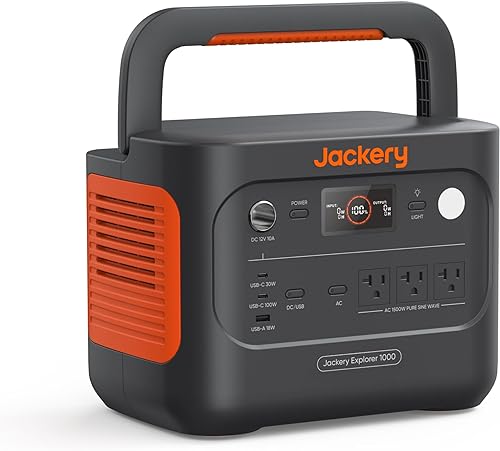
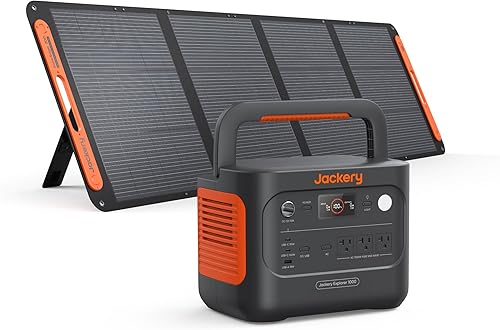
The Jackery Explorer 1000 v2 shows the distinction: its standalone version includes the battery unit but no panel, while the Jackery Solar Generator 1000 v2 set includes a 200W panel.
 Best for simple solar bundles
Jackery Solar Generator 1000 v2 with 200W Panel
Portable power station vs solar generator: what's the difference?
A portable power station is the battery unit; a solar generator usually means that unit sold with or used with solar charging. The name doesn't guarantee that a panel comes in the box.
The station stores electricity, then supplies it through outputs such as AC outlets and USB ports. The Jackery Explorer 1000 v2 has three AC ports, two USB-C ports, one USB-A port and a DC car port.
“Solar generator” often refers to a package that combines a battery unit and a panel. Some brands also use the term for a station sold on its own that can accept solar input.
The Jackery Explorer 1000 v2 is a standalone power station with no panel included, while the Jackery Solar Generator 1000 v2 set includes a 200W panel. The model name alone doesn't tell you whether the equipment is bundled.
What does “solar generator” mean in a portable power station comparison?
It usually means solar charging is supported or a panel is part of a bundle. Check the package contents before assuming which meaning applies.
The Jackery solar set includes the Explorer 1000 v2 and a 200W panel. The panel and generator ship separately, so they may arrive at different times.
The name doesn't tell you the panel's wattage, connector, charging speed or compatibility. Those details determine whether the setup suits your plans.
What does each setup include?
A standalone power station gives you the battery unit; a solar generator kit may add one or more panels. Confirm the exact contents and check that the charging equipment fits your setup.
The standalone Jackery Explorer 1000 v2 has a 1,070Wh capacity and 1,500W AC output. Its solar panel is sold separately.
The Jackery Solar Generator 1000 v2 with 200W Panel has the same capacity and AC output. It adds a 200W panel, so you don't have to choose a panel separately to start using solar charging.
A panel isn't stored energy. It produces power when sunlight reaches it, while the battery holds energy for later use or when sunlight is unavailable.
For a plain-language explanation of stored capacity, read what a watt-hour means. Capacity and output answer different questions: how much energy is stored and how much power the unit can supply at once.
Is a panel always included with a solar generator?
No. A “solar generator” name can appear on a standalone unit, a bundle or a kit with a panel, so verify the package contents.
The standalone Explorer 1000 v2 package includes the power station and user manual. Its panel is optional, and Jackery specifies that this model is compatible only with Jackery solar panels for solar charging.
The bundled Jackery version includes a 200W panel. If you already own a compatible panel, a bundle could leave you with equipment you don't need.
Can you add a panel to a portable power station later?
Often, if the panel and station are compatible. Check the solar input and connector requirements for your exact models before choosing a panel.
The Renogy 200W Portable Solar Panel names the Jackery Explorer 1000 v2 as a compatible model. The panel has an MC4 output, and its 4-in-1 adapter is sold separately, so confirm which cable or adapter your setup needs.
How should you choose between a power station and a solar generator for an outage?
Choose enough battery capacity and output for your essential devices, then add solar if you need to recharge without an outlet. Your expected loads and outage length matter more than the name on the box.
Write down each device you want to power, its wattage and the hours you expect to use it. Check the station's output against the device's needs, including any startup surge, and estimate the energy the devices will consume.
Solar charging can help during a longer outage, but it doesn't guarantee continuous power. Weather, shade, panel angle and your daily use all affect how much energy you can collect.
If you're sizing backup for a particular appliance, see what a power station can run. For a larger setup, compare capacity and output against your actual loads instead of choosing by a “generator” name.
When does a solar panel matter most?
A panel matters when you'll need to recharge outdoors or during a long outage without dependable access to a wall outlet. It adds another charging source, but sunlight and setup conditions affect the energy it can provide.
Choose a place where the panel can sit in full sun, and consider whether you'll be able to reposition it during the day. Shade from a roof edge, tree or nearby building can reduce the available solar input.
The panel must also connect to the station's supported solar input. Check the manufacturer's compatibility guidance and the cables included with both pieces.
How do wall charging and solar charging compare?
Wall charging suits preparation when household power is available; solar charging suits places where you can position a panel in sunlight. The time each takes depends on the charging method and conditions.
The Explorer 1000 v2 defaults to a 1.7-hour full charge from an AC source. Jackery says its emergency mode can reach a full charge in 1 hour when enabled in the Jackery app.
For solar, Jackery states that its 200W panel can charge the Explorer 1000 v2 to 80% in 6 hours. Treat that as a reference, since actual results vary with sunlight and other conditions.
Our guide to portable power station charging time explains what affects a recharge estimate. If you expect to run devices while charging, read whether you can charge and use a power station at the same time.
Which setup suits camping and travel?
Choose a standalone station if you mainly need stored power; choose a panel bundle if you also want solar charging equipment. Consider how much gear you can carry, where you'll place a panel and whether you'll have access to an outlet.
The Jackery Explorer 1000 v2 weighs 23.8 lb. The Renogy 200W panel weighs 13.9 lb, so bringing a separate panel adds weight and takes up space.
A foldable panel still needs a clear, sunny place to charge. If your campsite is shaded or you'll be moving often, plan on other supported ways to recharge.
For road trips and campsites, measure your storage space and account for both pieces of equipment. If you travel by air, check airline rules for carrying the battery before booking.
How do you set up and care for a solar charging kit?
Start by charging the station, learning its controls and checking that the panel connection matches the station input. Practice setting up the panel before an outage or trip so you know where the cable goes and where sunlight reaches.
Place the panel on a stable surface in a sunny spot, then connect it using the compatible cable or adapter. Keep the station where you can see its charge level and reach the outlets without stretching cables across walkways.
Follow the instructions for the exact station and panel, including guidance for storage and operating conditions. Keep connectors clean and dry, avoid pulling a cable by its wire, and pack a foldable panel securely after use.
For the Jackery Explorer 1000 v2, emergency one-hour charging must be enabled in the Jackery app each time you want to use that mode. Its regular default is a 1.7-hour full charge, which Jackery says is intended to optimize battery health.
What mistakes should you avoid when comparing solar generators?
The most common mistake is buying by the name instead of checking the included equipment and whether it fits your intended use. A “solar generator” label alone doesn't confirm that a panel or the right cable is included.
Don't assume every panel works with every station. The Jackery Explorer 1000 v2 is specified for Jackery solar panels, while the Renogy panel names this Jackery model as compatible; connector and adapter requirements still matter.
Don't treat panel wattage as a guaranteed charging rate. Sunlight, shade, panel position and the station's input limit affect charging, so leave room in your plan for slower conditions.
Don't choose capacity without listing the devices you need to run. A panel can replenish stored energy when conditions allow, but it doesn't replace a battery sized for your expected use.
How can you compare two power station models fairly?
Compare capacity, output, charging inputs, connections, size and package contents for the exact models. These details show what the equipment can do and what else you'll need.
Start with capacity in watt-hours, which estimates stored energy. Then check AC output and surge information against the devices you plan to run.
Next, check charging methods and compatibility. A station with solar input may still require a specific brand of panel, connector or adapter.
Finally, confirm what's in the box. A standalone unit may suit you if you already have a compatible panel, while a bundle can simplify the choice if its panel fits your needs.
Use the portable power station checklist to compare the details that affect your use. It can help you avoid buying a panel you already own or choosing a kit with the wrong connection.
Who should buy a portable power station or solar generator?
Buy a standalone portable power station if you want to choose solar equipment later; buy a solar generator kit if its included panel is the right fit. Either can suit backup or travel, but the bundle only helps if you'll use the panel.
Choose the standalone Explorer 1000 v2 if you want a 1,070Wh station with 1,500W AC output and plan to select a Jackery panel separately. The bundled version suits you if you want that station paired with a 200W panel.
Skip the panel bundle if you already have a compatible panel or don't expect to recharge from sunlight. Skip a standalone unit if you need a ready-to-use solar package and don't want to source the panel and connection parts separately.
For a portable power station vs solar generator decision, check capacity, output, panel compatibility and package contents before buying. If a ready-made kit fits your needs, compare options in our solar generator kit guide.
Sources
- Jackery Explorer 1000 v2
- Jackery Solar Generator 1000 v2 with 200W Panel
- Renogy 200W Portable Solar Panel
Frequently asked questions
Is a solar generator different from a portable power station?
Often, the names describe the same battery-based device. A portable power station stores energy and supplies AC, USB or DC power, while “solar generator” commonly describes a power station sold with or used with panels.
Check the package contents to see whether a panel is actually included.
Can a portable power station work without solar panels?
Yes. You can charge a portable power station from a wall outlet or another supported source, then use its stored energy without a solar panel.
A panel helps you recharge away from an outlet, but it isn't required for the station to provide power.
Does a solar generator include panels?
Not always. Some kits include a panel, while other power stations use “solar generator” in the name even when the panel is optional.
Check the included components to see whether a panel is part of the package.
Can any solar panel charge any power station?
No. The panel output, connector and power station solar input must be compatible.
The Jackery Explorer 1000 v2 is specified as compatible only with Jackery solar panels, while Renogy names the Explorer 1000 v2 as compatible with its panel.
Check the requirements for each exact model.
Is a 200W solar panel enough for a power station?
A 200W panel can add energy, but charging time depends on sunlight, panel position, shade and the station's input limits. Jackery states its 200W panel can charge the Explorer 1000 v2 to 80% in 6 hours.
Clouds and other real-world conditions can change the result.