Jackery Explorer 1000 v2 vs Bluetti AC180: Which Is Better? (November 2026)
The Jackery Explorer 1000 v2 is the better overall pick for most people because it is lighter, smaller and still delivers 1,500W. Choose the Bluetti AC180 when you want more battery capacity, stronger output and broader charging options.
On this page (11 sections)
- Jackery Explorer 1000 v2 vs Bluetti AC180: the quick verdict
- How do the two power stations compare side by side?
- Which has more usable battery capacity?
- Which one handles higher-power devices?
- How do charging options differ?
- Which is better for solar charging?
- What makes the Jackery Explorer 1000 v2 a better buy?
- What makes the Bluetti AC180 a better buy?
- Which station is easier to use every day?
- How should you set up and care for either power station?
- Which power station should you choose?
The Jackery Explorer 1000 v2 wins for most buyers because it combines a 1,070Wh battery and 1,500W output with a much lower 23.8 lb weight. The Bluetti AC180 is the better fit when its 1,152Wh capacity, 1,800W output and 500W solar input matter more than portability.
This Jackery Explorer 1000 v2 vs Bluetti AC180 comparison focuses on the differences that change daily use: battery size, power limits, charging, ports, weight and emergency backup.
Both are portable power stations with LiFePO4 batteries. The Jackery is the compact travel choice, while the Bluetti is the stronger stationary or base-camp option.
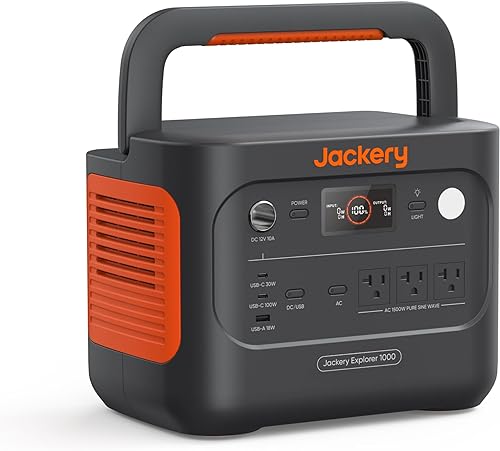

Jackery Explorer 1000 v2 vs Bluetti AC180: the quick verdict
Choose the Jackery Explorer 1000 v2 for camping, road trips and easier lifting. Its 23.8 lb body, foldable handle, 1,500W output and 3 AC ports make it easier to move between a vehicle, campsite and indoor backup spot.
Choose the Bluetti AC180 for higher loads and more solar input. Its 1,800W output, 2,700W peak and 500W solar input give it more headroom for demanding equipment, while the 1,152Wh battery adds a modest capacity advantage.
The Jackery scores 9.1 and the Bluetti scores 8.5. Our score weighs specs, features and buyer feedback against the needs behind this comparison.
The scores do not mean the Bluetti is a poor choice. They reflect the Jackery's better balance of weight, size, ports and useful output for the broadest group of portable-power shoppers.
How do the two power stations compare side by side?
The Jackery is lighter and smaller, while the Bluetti supplies more capacity and output. The table shows the core trade-off before you decide which details matter most.
| Product | Best for | Capacity | Output | Weight | Our score |
|---|---|---|---|---|---|
| Jackery Explorer 1000 v2 | portability | 1,070Wh | 1,500W | 23.8 lb | 9.1 |
| Bluetti AC180 | high output | 1,152Wh | 1,800W | 37.4 lb | 8.5 |
The Jackery measures 12.87 x 8.82 x 9.72 in and weighs 23.8 lb. The Bluetti measures 13.39 x 9.72 x 12.48 in and weighs 37.4 lb.
That makes the Bluetti about 13.6 lb heavier and taller by 2.76 in. Those differences matter when you lift the unit into a vehicle, move it around a campsite or store it on a shelf.
The Bluetti has 2 AC outlets, while the Jackery has 3 pure sine wave AC ports. The Jackery also has 2 USB-C ports, 1 USB-A port and 1 DC car port.
Which has more usable battery capacity?
The Bluetti AC180 has the larger battery at 1,152Wh, compared with 1,070Wh for the Jackery. That 82Wh difference gives the Bluetti more stored energy for the same device load.
A watt-hour figure describes stored energy, not a promise that every device will run for exactly that many hours. Actual use depends on the device's operating power and the conversion involved between the battery and the outlet.
For simple planning, divide the battery capacity by the device's watt draw, then allow for conversion losses. A 100W load uses energy much more slowly than a 1,000W load.
The Jackery still has enough capacity for a useful mix of phones, lights, laptops and other moderate loads. Its smaller battery is paired with a lighter enclosure, so the trade-off is clear: easier transport in exchange for a little less runtime.
Choose the Bluetti if your priority is the longest runtime between charges. Pick the Jackery if moving the unit is part of your normal routine.
Which one handles higher-power devices?
The Bluetti AC180 wins on continuous output, with 1,800W compared with the Jackery's 1,500W. Its 2,700W peak output also gives it a strong start-up allowance for suitable loads.
The Jackery has a 3,000W surge peak, which is higher than the Bluetti's peak figure. That does not make it the higher-output station overall, since the Jackery's rated output remains 1,500W.
Rated output is the number to use when deciding whether a device can run continuously. Surge output applies to a short start-up demand and does not replace the continuous rating.
The Bluetti suits equipment that sits closer to the 1,500W to 1,800W range. The Jackery suits common portable loads where a 1,500W ceiling is enough and lower weight has more value.
Read the watt label on each device you plan to power. Add simultaneous loads before choosing, rather than judging by the highest single appliance alone.
How do charging options differ?
The Jackery offers a very fast emergency charging mode, while the Bluetti accepts more solar input. These stations serve different charging priorities.
The Jackery can charge from 0% to 100% in 1 hour when emergency charging is activated in the Jackery App. Its default full-charge mode takes 1.7 hours to support battery health, and its app also includes a 30 dB quiet overnight charging mode and an energy efficiency mode.
The Bluetti reaches full charge in 1 hour with 1,440W AC input. Its solar input reaches 500W, with a stated solar charging time of 2.8 to 3.3 hours using only solar energy.
The faster Jackery mode is useful when a storm or travel plan leaves little charging time. The Bluetti's larger solar input is better for an off-grid setup with suitable sunlight and a compatible panel.
For routine use, choose a charging mode that matches your schedule. Use emergency charging when speed matters, and use the default Jackery mode when you want its normal battery-health setting.
Which is better for solar charging?
The Bluetti AC180 is the more flexible solar choice because it accepts compatible panels from other manufacturers and supports up to 500W. The Jackery works with Jackery solar panels only.
The Bluetti accepts solar input with 12–60V open-circuit voltage, a total solar input of up to 500W and a compatible solar connector. Its included items include an AC charging cable, car charging cable and solar charging cable.
The Jackery's data identifies solar power as a power source and states compatibility only with Jackery solar panels. Its box includes the Explorer 1000 v2 and user manual, while the solar panel is optional.
That difference matters if you already own a compatible panel or want to compare panels from different brands. It matters less if you plan to use a Jackery solar setup from the start.
For a portable kit, match the panel, connector and input limits before connecting anything. Solar charging works best when the panel and power station are treated as one planned system.
The Jackery Explorer 1000 v2 vs Anker SOLIX C1000 Gen 2 comparison is useful if you are also considering another high-capacity travel station.
What makes the Jackery Explorer 1000 v2 a better buy?
The Jackery Explorer 1000 v2 is the better buy when portability, multiple device ports and quick emergency charging are your main needs. It brings a strong 1,500W output into a 23.8 lb body.
Its 1,070Wh capacity is close to the Bluetti's 1,152Wh capacity, but the Jackery is smaller in every listed dimension. A foldable handle also supports the portable role.
The port layout is practical for a group of small devices. You get 3 pure sine wave AC ports, 2 USB-C ports, 1 USB-A port and 1 DC car port, plus LED lights.
Its 100W USB-C charging can power suitable devices without separate power adapters. That reduces the number of accessories you need around the station during a trip.
The Jackery uses an LFP battery rated for over 70% of its original capacity after 4,000 charge cycles. Jackery also gives it a lifespan exceeding 10 years under that stated cycle claim.
Choose the Jackery for a car, campsite, emergency closet or portable work setup. It is the natural match for anyone who expects to carry the station often.
What makes the Bluetti AC180 a better buy?
The Bluetti AC180 is the better buy when higher output, larger capacity and home backup features come first. Its 1,800W output and 1,152Wh battery make it the more capable station on paper.
The AC180 can boost its output to 2,700W through the BLUETTI App. That gives suitable higher-demand devices more starting room, although the regular 1,800W output remains the main figure for continuous use.
It also includes a 20 ms UPS function for emergency power. That feature gives the Bluetti a clearer role beside essential home equipment than a station intended mainly for travel.
The 500W solar input is another advantage for a fixed charging setup. The Bluetti can use compatible solar panels from other manufacturers when they meet its voltage, wattage and connector requirements.
The trade-off is a 37.4 lb body with dimensions of 13.39 x 9.72 x 12.48 in. Move it with a plan, and treat it as a base-camp or home-backup unit if frequent carrying would be tiring.
The Bluetti Elite 100 V2 review gives you another Bluetti option to compare if the AC180 feels larger than your normal power needs.
Which station is easier to use every day?
The Jackery is easier to carry and spread across several small devices, while the Bluetti is better when the station stays in one place. Daily convenience depends on where your power needs happen.
The Jackery's lower weight helps when you move it from storage to a car or from a vehicle to a campsite. Its 3 AC outlets also give you more AC connection points than the Bluetti's 2.
The Bluetti's larger enclosure and heavier weight are easier to accept when it sits beside a home backup area or camp kitchen. Its higher output means you have more room for demanding devices within its rated limit.
App control is available for both brands. Jackery's app controls charging modes, while the Bluetti App can give the AC180 its 2,700W boost.
Plan the station around the place where it will spend most of its time. A heavier station can be the better tool when it does not need to move, but a lighter one wins when every trip includes lifting.
How should you set up and care for either power station?
Start by matching the station to the device load, then keep its charging parts and ports organized. Good setup is mostly about respecting output limits and making the station easy to reach.
Write down the watt draw of the devices you plan to use together. Compare their combined demand with 1,500W for the Jackery or 1,800W for the Bluetti.
Keep cables together with the station so an emergency setup does not depend on finding separate accessories. The Bluetti includes AC, car and solar charging cables, while the Jackery includes the station and user manual.
Use the correct app settings for the situation. The Jackery's emergency mode is for a fast full charge, its quiet overnight mode is for quieter charging, and its energy efficiency mode is for a different balance of use.
Keep vents, ports and controls accessible. Store the station where its weight can be handled safely, especially the 37.4 lb Bluetti.
Before a trip or storm, charge the station and place its cables nearby. During use, connect only devices whose combined load fits the station's output rating.
If you are weighing the brands more broadly, the Jackery vs Bluetti comparison explains how their power-station approaches differ beyond these 2 models.
Which power station should you choose?
Pick the Jackery Explorer 1000 v2 if you want the best balance of portability, output and everyday connections. It is the overall winner for most readers because its 23.8 lb weight makes its 1,070Wh capacity easier to take where power is needed.
Choose the Jackery for camping, road trips, emergency storage and mixed small-device charging. Its 1,500W output, 3 AC ports and fast emergency charging cover a wide range of portable use.
Pick the Bluetti AC180 if you need more output, more solar input or a UPS function. Its 1,800W output, 2,700W peak, 500W solar input and 20 ms UPS give it the stronger home-backup profile.
The Bluetti also wins when 1,152Wh capacity is more important than carrying weight. Its included solar charging cable and support for compatible third-party panels help it fit a planned solar setup.
The final choice is simple: the Jackery is the lighter all-rounder, and the Bluetti is the higher-output backup station. In the Jackery Explorer 1000 v2 vs Bluetti AC180 decision, choose the Jackery for mobility and the Bluetti for stationary power headroom.
For another comparison using the newer Bluetti line, see Anker SOLIX C1000 vs Bluetti Elite 100 V2.
Frequently asked questions
Which has more battery capacity, the Jackery or Bluetti?
The Bluetti AC180 has more capacity at 1,152Wh, while the Jackery Explorer 1000 v2 has 1,070Wh. The difference is 82Wh, so the Bluetti has the advantage for longer use at the same load, while the Jackery is easier to carry.
Which power station is lighter?
The Jackery Explorer 1000 v2 is lighter at 23.8 lb. The Bluetti AC180 weighs 37.4 lb, making it better suited to a base-camp or home-backup role than repeated carrying.
Can the Jackery and Bluetti charge from solar panels?
Yes, both support solar charging. The Jackery works only with Jackery solar panels, while the Bluetti accepts compatible panels with 12–60V open-circuit voltage, up to 500W total solar input and a compatible connector.
Which power station has more AC output?
The Bluetti AC180 has the higher rated output at 1,800W and can reach 2,700W peak output. The Jackery Explorer 1000 v2 provides 1,500W output and a 3,000W surge peak.
Which one is better for emergency backup?
The Jackery is easier to move and provides 3 AC outlets, while the Bluetti offers a larger battery, higher continuous output and a 20 ms UPS function. Pick the Jackery for portable emergency power and the Bluetti for a heavier home-backup setup.


